
Customizing your sales pipeline can transform how your team manages deals and forecasts revenue. The key is to align pipeline stages with buyer decisions rather than internal sales actions. Here’s a quick summary of how you can improve your sales process:
- Map the buyer journey: Focus on customer milestones like "Budget Approved" instead of seller actions like "Proposal Sent."
- Refine deal stages: Use 5–7 clear, buyer-focused stages with realistic probabilities based on historical data.
- Automate tasks: Reduce manual data entry and admin work by automating notifications, follow-ups, and workflows.
- Leverage data and AI: Use historical sales data and predictive AI tools to improve forecasting accuracy and prioritize deals.
- Test and review: Use a sandbox environment to test changes and regularly review pipeline performance metrics.
Companies that follow these steps report shorter sales cycles, better forecast accuracy, and improved close rates. Whether you’re a small business or a large enterprise, tailoring your pipeline to buyer behavior is key to driving results.
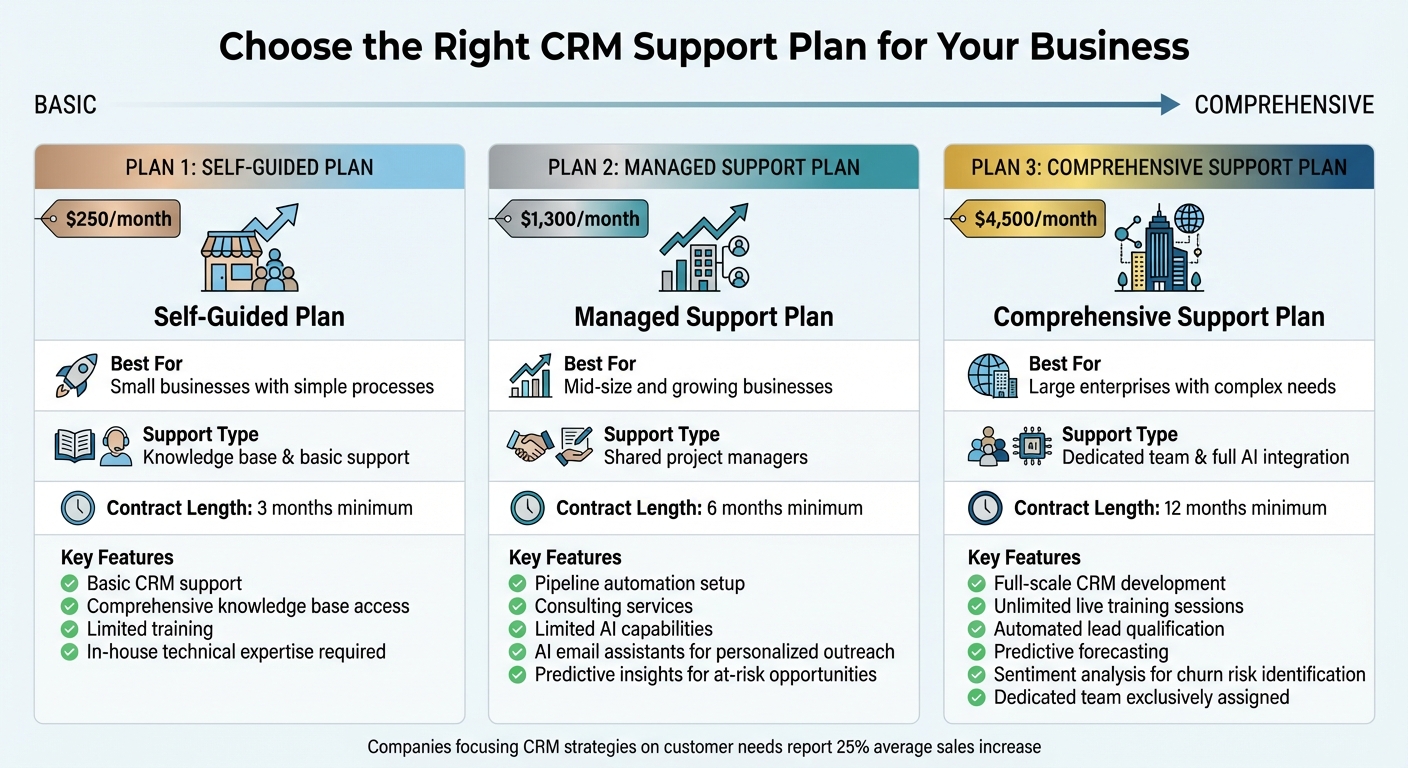
CRM Support Plans Comparison: Features, Pricing, and Best Use Cases
Sales Automation Workshop: How to Build a Customized Pipeline With Nutshell
sbb-itb-f02ae4e
1. Review Your Current Sales Process
Start by documenting your current sales pipeline exactly as it operates today. Why? Because nearly half of executives (44%) believe their pipeline isn’t effective [6]. This often happens when the pipeline stages don’t align with how buyers actually make decisions. By capturing the process as it is – not as you’d like it to be – you lay the groundwork for creating a pipeline that reflects real buyer behaviors and decision points.
1.1 Map the Customer Journey
Begin by mapping your process offline – grab a whiteboard or open a document. The key is to center this process on buyer milestones rather than seller actions. For example, instead of focusing on "Proposal Sent", ask what decision the buyer has made by that point. Have they confirmed their problem? Approved a budget? Identified key decision-makers?
Break the journey into four to seven distinct stages, each based on observable buyer decisions. Clearly define entry and exit criteria for every stage. For instance, a deal shouldn’t move to "Evaluation Active" until teams like legal, IT, or procurement are involved [1][2][3]. This kind of clarity ensures your pipeline mirrors the buyer’s journey more effectively.
1.2 Gather Feedback from Your Sales Team
Your sales team is a goldmine of practical insights. While data can show where deals are getting stuck, your reps often know why. Set up interviews to dig into these bottlenecks. Are they spending too much time on manual data entry? Is the qualification process too loose, leading to a flood of low-quality leads clogging the pipeline?
A standardized sales process can lead to an 18% revenue increase [7]. To make this happen, establish a formal system for gathering feedback and review it regularly alongside performance metrics. Combining their input with your data analysis provides a clearer picture of issues and how to address them [8].
1.3 Review Historical Sales Data
Once you’ve mapped the process and gathered feedback, turn to your historical sales data to validate and refine your findings. Dive into the past 12 months of data to analyze win rates by stage, conversion rates between stages, and the average time deals spend in each phase [1][9].
If deals frequently stall at a specific stage, it could signal a bottleneck. In that case, consider breaking the stage into smaller steps or tightening the criteria for moving forward [9]. Don’t rely on default CRM probabilities – use historical win rates to set realistic percentages [1].
Also, take a close look at "Closed Lost" deals to spot recurring patterns, such as budget issues or lack of stakeholder involvement [9]. Weighted pipeline forecasting based on historical win rates is 25% more accurate than flat probability models [1], giving you a more reliable way to predict outcomes and refine your process.
2. Set Up Custom Deal Stages and Properties
Refine your sales process by designing buyer-focused stages and creating custom fields to track key milestones. This section explains how to align your pipeline with buyer behavior for better results.
2.1 Match Stages with Business Milestones
Your sales pipeline should mirror your customer’s journey, not your internal workflow. Focus on tracking real buyer commitments – like using "Budget Confirmed" to mark significant progress.
"A pipeline should reflect the customer’s journey, not your internal bureaucracy." – Aeroleads [10]
Keep your pipeline concise, with 5–7 buyer milestones. Overcomplicated pipelines with 12–15 stages can reduce CRM adoption rates by 20–25% [10]. Use past-tense stage names – such as "Contract Sent" instead of "Contracting" – to clearly indicate milestones achieved [11]. To identify meaningful stages, interview your top-performing reps and analyze the milestones they encountered in their last five successful deals [10].
Assign realistic probability percentages to each stage based on historical conversion rates instead of relying on generic defaults. Weighted forecasts are more accurate when probabilities reflect the true likelihood of closing [21, 22]. Companies that switch to buyer-centric criteria often see a 15–20% improvement in forecast accuracy within two quarters [12]. Tying your pipeline to buyer behavior is essential for accurate forecasting.
2.2 Add Custom Fields for Key Metrics
Standard CRM fields often fall short of capturing all the details you need. By adding custom fields, you can gain deeper insights into deal health and pipeline velocity. For example, financial fields like "Deal Value" (in USD), "Budget Confirmed" (true/false), and "YTD Revenue Won" provide a clearer picture of your pipeline’s value [25, 12]. Temporal fields, such as "Expected Close Date", "Stage Age" (time spent in the current stage), and "Days Since Last Activity", help identify stalled deals [12, 1].
Stakeholder fields like "Primary Decision Maker" and "Key Contacted" ensure you’re engaging the right people [25, 12, 1]. Teams that use custom properties to enforce qualification criteria often experience a 23% higher lead-to-opportunity conversion rate [10].
Use specific field types – like dropdowns, date pickers, and booleans – and require mandatory inputs (e.g., "Decision Maker") to maintain consistent and complete data [24, 23, 25]. These metrics lay the groundwork for setting clear criteria to move deals forward.
2.3 Define Advancement Criteria
Establish clear, measurable conditions that indicate buyer commitment before advancing deals. Focus on buyer actions – like "Buyer agreed to ROI analysis" – rather than seller activities such as "Sent proposal" [1, 28].
"Pipeline stages must reflect buyer decisions, not seller activities: Stages defined by what the buyer has agreed to – not what the rep has done – provide accurate probability weighting and reduce the bloated pipelines that make forecasting unreliable." – Digital Applied [1]
Require key data inputs before advancing deals. Mandatory fields and checklists help prevent premature stage progression and ensure clean data [27, 3]. Set up automated "deal rot" alerts to notify managers when deals remain in a stage for more than 1.5 times the average duration [10]. Automation and clear pipeline structures can lead to a 30–40% higher close rate [1].
Frameworks like BANT (Budget, Authority, Need, Timing) can help qualify leads before they enter your active pipeline [27, 20]. Instead of vague milestones like "Demo Completed", use specific ones like "Evaluation Criteria Agreed" to confirm buyer commitment to the next step [1, 28]. Additionally, auto-flag deals that have been inactive for 14+ days to prompt timely action [1, 28].
3. Use Automation to Streamline the Pipeline
Automation can take a huge load off your sales team, cutting non-selling tasks by up to 70% and improving close rates by 30–40% [1][5]. By setting up smart triggers and workflows, you can eliminate repetitive admin work and let your team focus on what they do best: closing deals.
3.1 Automate Notifications and Task Creation
A well-configured CRM can trigger tasks and alerts at key moments. For instance, when a prospect opens a proposal document, the system can automatically move the deal to "Under Review" and assign a follow-up task for three days later. This ensures no lead slips through the cracks.
These alerts should reach both the sales rep and their manager, turning overlooked opportunities into actionable tasks. Why is this important? Because leads contacted within five minutes are 21 times more likely to convert [15].
To standardize workflows, use stage-specific task templates. For example, when a new lead enters the pipeline, the system could automatically generate a checklist that includes research, sending an introductory email, and scheduling a discovery call [5]. Automated lead routing – based on criteria like territory, deal size, or industry – further removes manual hand-offs and speeds up the process [5].
"Automation eliminates 60-70% of manual CRM data entry." – Digital Applied [1]
Once your alerts and workflows are in place, focus on scheduling structured follow-ups to maintain consistent engagement.
3.2 Create Follow-Up Sequences
Did you know 80% of sales require at least five follow-ups, yet nearly half of sales reps stop after just one [1][15]? Automated sequences ensure leads are nurtured persistently across multiple channels, including email, SMS, and LinkedIn, without letting anything fall through the cracks.
Set up multi-channel drip campaigns that automatically pause when a prospect responds [1][14]. Instead of relying on generic, time-based follow-ups, use triggers based on real-time buyer behavior. For example, rather than sending a follow-up three days after a demo, automation can kick in when the prospect visits your pricing page or downloads an ROI calculator [13][14].
3.3 Apply AI for Predictive Insights
AI tools can analyze deal characteristics and engagement patterns to predict which opportunities are most likely to close. Predictive lead scoring takes into account factors like demographics, firmographics, and behavioral data to help your team focus on high-potential leads [17][18]. Similarly, pipeline health scoring assigns risk ratings based on metrics like days since last activity or stakeholder involvement [1].
Companies using AI-assisted forecasting achieve up to 96% accuracy, compared to just 66% with human judgment alone [13]. Revenue teams leveraging AI have also reported 29% higher sales growth [18]. Tools like conversation intelligence can even transcribe calls, analyze customer sentiment, flag objections, and recommend next-best actions [16][18].
"AI should do the repetitive work at machine speed, while humans own judgment, tone, and the moments that actually build trust." – SalesHive [18]
AI isn’t here to replace your team – it’s here to amplify their impact. Use AI-generated forecasts as a complement to human insights, especially for complex deals. Just make sure your CRM data is accurate before deploying AI, as flawed data can lead to unreliable predictions [18].
4. Test and Optimize Your Custom Pipeline
Before rolling out your custom pipeline, put it through rigorous testing. This step is essential to catch potential errors and confirm that automation rules, stage transitions, and metrics work as intended. Once you’re confident in its functionality, move to controlled testing in a sandbox environment.
4.1 Test in a Sandbox Environment
A sandbox environment acts as a safe testing ground – essentially a duplicate of your production CRM – where you can experiment freely without jeopardizing live customer data or ongoing deals. It’s the perfect space to configure stages, test automation, and simulate deal progressions before going live [19][21].
Ensure the sandbox mirrors your live setup, including environment variables, database access, and integrations. Use synthetic data to replicate real-world scenarios while protecting sensitive information [19]. Some CRMs even offer a "Draft" mode for pipelines, allowing you to build and tweak configurations without touching the live system [20].
"Draft pipelines give you a safe place to design, test, and refine your pipeline before it ever touches an open lead." – Chris Cain, VP of Product Development, Nutshell [20]
Test automation rules thoroughly – this includes notifications, task assignments, email sequences, and stage transitions – to confirm they operate as expected [20].
4.2 Track Key Metrics After Customization
Once sandbox testing is complete, deploy your pipeline and monitor its performance closely. Pay attention to stage-by-stage conversion rates to identify bottlenecks. If a specific stage shows conversion rates significantly below the industry benchmark of 20–30%, it may need refinement [24].
Also, keep an eye on your Pipeline Coverage Ratio, calculated by dividing the total pipeline value by your quota. High-performing teams typically aim for a ratio of 3–5× their quarterly quota [24]. Other key metrics to track include Sales Cycle Length and Sales Velocity – both indicators of how efficiently your pipeline is driving revenue [22][23].
| Metric Category | Key Indicators | Target/Benchmark |
|---|---|---|
| Pipeline Health | Coverage Ratio, Weighted Value | 3–5× Quota [24] |
| Conversion | Stage-to-stage conversion, Win Rate | 20–30% Win Rate [24] |
| Velocity | Sales Cycle Length, Sales Velocity | Decreasing Cycle Time [23] |
| Activity | Lead Response Time, Touchpoints | < 1 Hour Response [23] |
Monitor these metrics on different timelines: daily for immediate issues like response time, weekly for momentum, and monthly for strategic trends. Set up automated alerts for deals that linger in one stage for more than 1.5 times the average duration to avoid stagnation [24].
4.3 Schedule Regular Reviews
Once your custom pipeline is live, regular reviews are essential to keep it aligned with changing market dynamics and buyer behavior. For example, sales cycles have lengthened by 21% since 2020 [7]. Conduct weekly reviews to assess deal health and identify at-risk opportunities [7]. On a monthly basis, evaluate whether your pipeline structure still reflects how deals actually progress [2].
Quarterly, compare forecasted revenue with actual results and refine stage probabilities based on 12-month win rates [1][7]. For instance, if historical data shows only 30% of deals at the "Proposals Sent" stage close, update that stage’s conversion rate accordingly [1]. This adjustment can improve the accuracy of your weighted forecasts by up to 25% [1].
"Your forecast is only as reliable as the pipeline feeding it. If your stages are vague, ambiguous, or out of sync with your sales process, the numbers get fuzzy fast." – INSIDEA [2]
Before making any structural changes, test them in your sandbox environment to avoid disrupting active deals. This ensures that updates enhance performance without causing unnecessary issues [20].
5. Work with CRM Experts Online for Customization Support
Once you’ve tested and fine-tuned your custom pipeline, leveraging expert support can help take your efforts to the next level. Building and maintaining a tailored sales pipeline involves continuous updates, smarter integrations, and strategic improvements. That’s where CRM Experts Online steps in, managing everything from initial system design to implementation, support, and training [25]. Their team specializes in certified consulting and development for major platforms like SugarCRM, Zoho, Salesforce, HubSpot, and NetSuite [26].
What makes their approach stand out is the integration of AI-powered tools directly into CRM workflows. These tools handle tasks like lead scoring and provide predictive insights [27]. For example, advanced AI platforms can analyze over 33 billion interaction signals each week to deliver actionable deal predictions [28]. AI-driven lead qualification tools also assess large datasets to prioritize prospects most likely to convert, saving time and improving accuracy [29]. With expert support, you can maintain the efficiency and precision achieved during your pipeline optimization phase. CRM Experts Online offers various support plans tailored to different business needs.
5.1 Comprehensive Support Plan
The Comprehensive Support Plan, priced at $4,500 per month, is designed for large enterprises with intricate sales processes. This plan includes full-scale CRM development, consulting, and AI integration, with a dedicated team assigned exclusively to your account for a 12-month commitment. Features include unlimited live training sessions and access to advanced AI tools such as automated lead qualification, predictive forecasting, and sentiment analysis that identifies potential churn risks based on customer feedback [29]. This plan is ideal for businesses requiring extensive customization beyond standard configurations, ensuring continuity and a deep understanding of your unique requirements.
5.2 Managed Support Plan
For $1,300 per month, the Managed Support Plan offers a balance of professional guidance and affordability. This option is perfect for mid-size or growing businesses that need more than basic support but don’t require a fully dedicated team. Shared project managers assist with pipeline automation, consulting, and limited AI capabilities. Services include setting up automation rules, configuring AI email assistants for personalized outreach [29], and deploying predictive insights to identify at-risk opportunities [28]. A 6-month minimum commitment applies, making this plan a cost-effective choice for scaling businesses.
5.3 Self-Guided Plan
The Self-Guided Plan, available for $250 per month, is tailored for small businesses with straightforward sales processes and in-house technical expertise. It provides basic CRM support and access to a comprehensive knowledge base. This plan is best suited for teams managing their own customization needs and includes limited training with a 3-month minimum contract.
| Plan | Monthly Cost | Best For | Support Type | Contract Length |
|---|---|---|---|---|
| Self‑Guided | $250 | Small businesses, simple processes | Knowledge base & basic support | 3 months |
| Managed Support | $1,300 | Mid‑size, growing businesses | Shared project managers | 6 months |
| Comprehensive | $4,500 | Large enterprises, complex needs | Dedicated team & full AI integration | 12 months |
"A CRM isn’t just a cost. It’s a time-saver, a workflow streamliner, and a revenue driver – when you pick the right one." – Expert Market [30]
Selecting the right plan depends on your business size, the complexity of your sales processes, and the level of internal technical expertise. Businesses without in-house tech teams often gain the most from the Managed or Comprehensive plans [30]. It’s worth noting that companies focusing their CRM strategies on customer needs have reported an average 25% increase in sales [31].
Conclusion
This checklist highlights that aligning your sales pipeline with buyer behavior, automating repetitive tasks, and refining processes regularly are crucial steps toward success. The strategies outlined here emphasize four main areas: analyzing your current sales process through journey mapping and team input, defining deal stages with clear progression criteria, leveraging automation to eliminate non-selling activities, and using real conversion data to test and improve continuously.
The benefits speak for themselves. For instance, tailored workflows can increase conversion rates by up to 28% [4], while structured pipeline management improves revenue forecasting accuracy by 89% [4]. Yet, many leaders still face challenges with ineffective pipelines [6], often due to implementing automation without first creating a solid pipeline foundation. As Digital Applied aptly explains:
"Automation without the right pipeline structure amplifies existing problems rather than solving them." – Digital Applied [1]
CRM Experts Online addresses these issues by reimagining pipelines around buyer behavior. Instead of focusing on seller actions like "Demo Sent", they define stages such as "Problem Confirmed." This approach, combined with automation that cuts manual data entry by 60–70% [1] and AI tools that identify at-risk deals and prioritize high-value opportunities, ensures a more effective pipeline. Their tiered support plans also make these solutions accessible for businesses of all sizes.
This adaptable framework enables businesses to tailor their pipelines based on their specific needs. Whether you opt for the Self-Guided Plan for simpler processes or the Comprehensive Support Plan for complex enterprise operations, the secret lies in conducting regular reviews and staying responsive to market changes. Companies that commit to this ongoing optimization see tangible results – CEOs who focus on pipeline management report up to 80% better performance in revenue and profitability [8].
FAQs
How do I choose the right 5–7 pipeline stages?
When deciding on 5–7 pipeline stages, make sure they align with your buyer’s journey instead of internal processes. Focus on major milestones such as prospecting, qualification, proposal, negotiation, and closing. To maintain clarity, establish specific entry and exit criteria based on actions taken by the buyer. Sticking to 5–7 stages keeps things straightforward, allowing for flexibility while ensuring accurate sales tracking and forecasting.
What should my stage probability percentages be?
Your stage probability percentages should come from historical data and actual buyer behavior, not generic or default values. By doing this, you’ll create percentages that truly represent the chances of closing deals at each stage. This approach helps you improve both forecast accuracy and pipeline management. Use real-world insights to align these percentages with how your sales process actually works.
Which metrics best show pipeline health after changes?
When evaluating the health of your sales pipeline after making changes, several metrics can provide valuable insights:
- Conversion Rates: Track how effectively leads move through each stage of the pipeline.
- Deal Velocity: Measure how quickly deals progress from start to close.
- Pipeline Coverage: Compare the total pipeline value to your sales targets to ensure adequate coverage.
- Stage-by-Stage Progression: Analyze how deals advance through each stage to spot potential bottlenecks.
- Pipeline Health Scores: Use scoring systems to assess the overall performance and predictability of your pipeline.
These metrics work together to reveal deal flow, pinpoint obstacles, and improve forecast accuracy, giving you a comprehensive view of your pipeline’s performance.
Related Blog Posts
- How AI Improves CRM Workflow Efficiency
- How Predictive Analytics Improves Revenue Forecasting
- AI-Powered CRM for Sales Pipeline Management: 2025 Trends
- Ultimate Guide to Real-Time CRM Analytics

CRM & ERP Enterprise Technology Expert and Entrepreneurial Executive with 20+ years of leading CRM, ERP, Customer Experience, and Block-chain initiatives and projects across internal and customer facing technologies. Proven success in closing large deals in Pre Sales customer facing engagements and deploying enterprise wide CRM & Customer Experience solutions internationally and domestically.