
Want to secure your CRM APIs without compromising performance? OAuth2 and JWT are the tools you need. OAuth2 handles controlled access, while JWT ensures quick, stateless validation. Together, they protect sensitive customer data and streamline integrations.
Here’s what you’ll learn:
- OAuth2 flows: Tailored options for user-based apps, system integrations, and server-to-server setups.
- JWT design: Key claims (
iss,sub,aud, etc.) that prevent misuse. - Token management: Short-lived tokens, rotation strategies, and secure storage tips.
- Common mistakes: Token mismanagement and over-permissive scopes – and how to avoid them.
- Security essentials: Use asymmetric keys, audit scopes quarterly, and never hardcode secrets.
Key takeaway: Use short-lived tokens, precise scopes, and automated refresh processes to secure CRM integrations while maintaining smooth operations.
Secure Integrations with OAuth 2.0 JWT Bearer Flow
sbb-itb-f02ae4e
OAuth2 Flows for CRM APIs
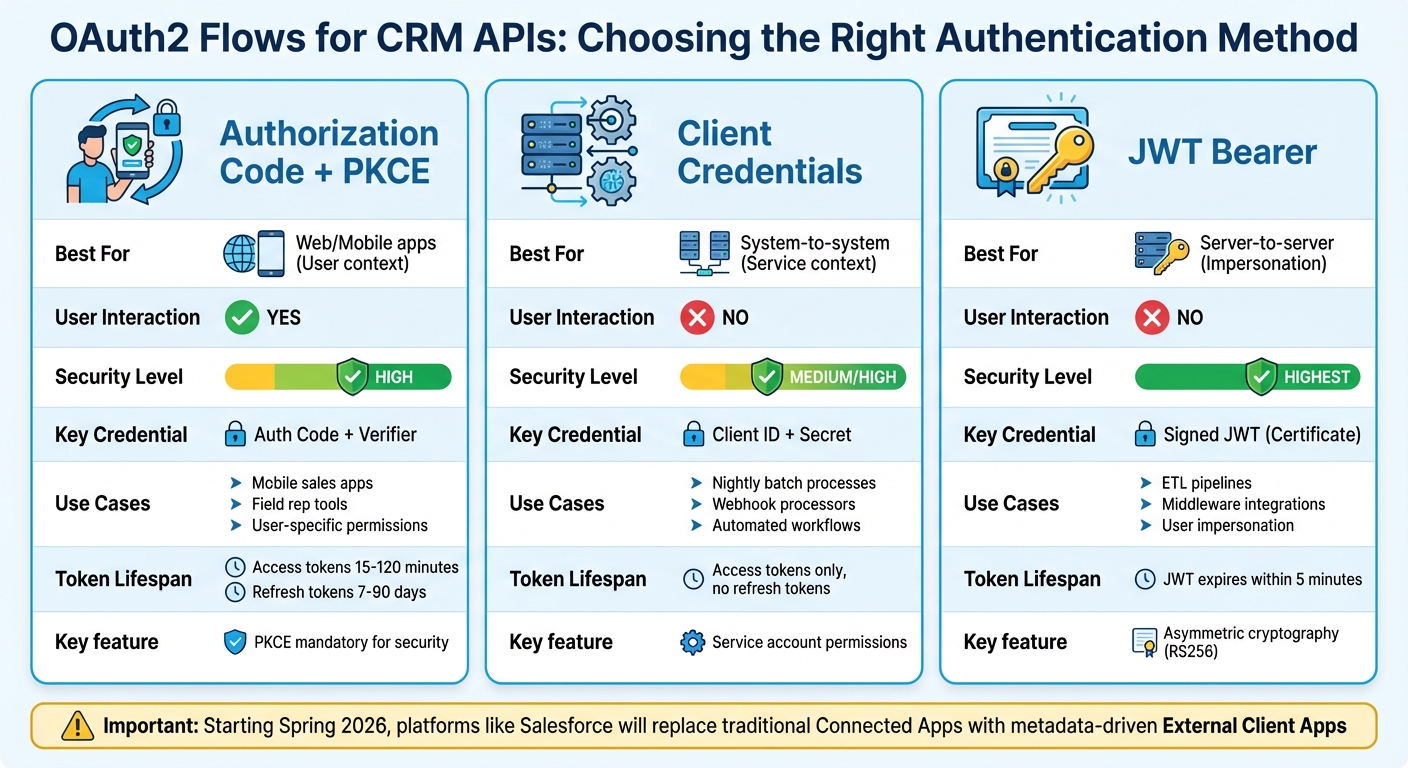
OAuth2 Flow Comparison for CRM API Integration
Different CRM integrations call for tailored authentication methods. For example, a mobile sales app and a nightly ETL job require entirely different approaches. OAuth2 provides three flows, each designed to suit specific scenarios.
Authorization Code Flow for User-Based Operations
If your CRM integration needs to act on behalf of a specific user, the Authorization Code Flow (with PKCE) is the ideal choice. This flow involves the user logging in via their browser, granting permission, and then your application receiving an authorization code. That code is then exchanged for access and refresh tokens.
This flow works best for web apps, mobile apps, and single-page applications where a real user interacts with the system. Take, for example, a mobile sales app used by field reps to view customer histories and log calls. The app operates with the same permissions as the logged-in user. So, if a rep doesn’t have access to executive accounts in the CRM, neither does the app.
To secure this process, PKCE is mandatory. Here’s how it works: your app generates a code_verifier and sends a hashed code_challenge during the authorization request. Later, it provides the original verifier when exchanging the code for tokens. This ensures only the original client can complete the flow, preventing attackers from misusing intercepted authorization codes [9][10].
Modern CRM platforms no longer store client secrets in mobile or browser-based apps. As Toxigon explains:
"OAuth2 is like giving someone a key to your house but only allowing them to use the bathroom… granting access to specific resources without exposing your credentials." – Toxigon [1]
Access tokens typically expire in 2 hours, though some platforms set this to as little as 15 minutes. Refresh tokens allow for smooth reauthentication when access tokens expire [7].
Now, let’s look at scenarios where no user interaction is required.
Client Credentials Flow for System Integrations
When your integration involves no user interaction – just two systems communicating – the Client Credentials Flow is the right fit. In this flow, your app authenticates using a client_id and client_secret to obtain an access token.
This approach is perfect for backend services, automated workflows, webhook processors, and scheduled tasks. Picture a nightly batch process that syncs CRM order data with your accounting system or a webhook that creates support tickets from customer-submitted forms. These integrations typically run under a service account with tightly controlled permissions.
The security of this flow hinges on keeping the client secret safe. Store it in environment variables or a secrets manager – never hardcode it or include it in version control. Since this flow doesn’t use refresh tokens, your app simply requests a new access token when the current one expires [9][10].
For even greater security, some integrations use the JWT Bearer Flow instead of shared secrets.
JWT Bearer Flow for Server-to-Server Access
For high-security, server-to-server integrations, the JWT Bearer Flow is the preferred option. Unlike the Client Credentials Flow, it avoids transmitting shared secrets and instead relies on asymmetric cryptography – specifically X.509 certificates and the RS256 signing algorithm.
Here’s how it works: your server generates a signed JWT (JSON Web Token) using a private key. The token includes claims like iss (your Consumer Key), sub (the user to impersonate), aud (the CRM login URL), and exp (expiration timestamp). The CRM validates the JWT using the public certificate you’ve uploaded and then issues an access token. No sensitive secrets are transmitted.
This flow is ideal for ETL pipelines, middleware integrations, or any scenario requiring user impersonation without interactive login. Keep in mind, the JWT assertion must expire within 5 minutes of server time, so synchronizing your servers with NTP (Network Time Protocol) is crucial to avoid "invalid_grant" errors [7].
A notable change: Starting in Spring 2026, platforms like Salesforce will disable traditional "Connected App" creation by default in new organizations, replacing it with metadata-driven "External Client Apps" [7].
| OAuth Flow | Best For | User Interaction? | Security Level | Key Credential |
|---|---|---|---|---|
| Authorization Code + PKCE | Web/Mobile apps (User context) | Yes | High | Auth Code + Verifier |
| Client Credentials | System-to-system (Service context) | No | Medium/High | Client ID + Secret |
| JWT Bearer | Server-to-server (Impersonation) | No | Highest | Signed JWT (Certificate) |
Choosing the right flow for your integration is key to ensuring secure and efficient CRM API access. Next, we’ll explore strategies for designing and managing JWT tokens for optimal security and performance.
JWT Design and Management for CRM APIs
After selecting an OAuth2 flow, it’s essential to design JWTs that protect CRM data effectively. A JWT acts as a compact claim package, detailing who you are, what you can access, and how long access is allowed. Structuring these tokens correctly is critical to avoid issues like token substitution, replay attacks, or unauthorized access to sensitive data.
Required JWT Claims for CRM Security
JWTs need specific claims to ensure CRM security. Let’s break down the key ones:
iss(issuer): Identifies the authorization server that issued the token. Your CRM must verify this matches the expected source to block forged tokens.sub(subject): Links the token to a unique user or integration. Use a stable identifier, such as a user ID, rather than an email address to maintain consistency [7].aud(audience): Specifies the CRM resource server that the token is intended for. This ensures tokens meant for one API can’t be misused on another [11].exp(expiration): Sets a time limit for the token’s validity. For example, Salesforce requires tokens to expire within 5 minutes of server time to avoid invalid grant errors [7].jti(JWT ID): Provides a unique identifier for each token, enabling revocation.typ(type): Helps distinguish between different types of tokens to avoid confusion.
Here’s how these claims look in practice:
| Claim | Purpose in CRM Security | Example Value |
|---|---|---|
iss |
Verifies the token source to prevent forgery | https://login.salesforce.com |
sub |
Links the token to a specific user or integration | 00558000000yFyDAAU |
aud |
Ensures token use is restricted to specific APIs | https://yourinstance.crm.com |
exp |
Limits the lifespan of stolen credentials | 1711382400 (Unix timestamp) |
jti |
Enables tracking and revocation of individual tokens | a3f2b1c9-4d5e-6f7a-8b9c-0d1e2f3a4b5c |
Now that the claims are in place, let’s dive into strategies for managing token expiration and refresh.
Token Expiration and Refresh Strategies
Once you’ve designed secure claims, managing the token lifecycle becomes the next priority. Short-lived access tokens – valid for 15 to 60 minutes – are ideal for limiting the impact of a compromised token [12]. For smoother user experiences, refresh tokens come into play. These tokens, often valid for 7 to 90 days, allow users to obtain new access tokens without repeatedly logging in.
A best practice here is refresh token rotation. With this approach, every time a refresh token is used, a new one is issued while the old one is invalidated. This method is crucial for detecting and preventing reuse attacks [13].
Devraj Patel, Founder & Identity Architect at SSOJet, highlights its importance:
"Reuse detection is the only way to stop an attacker who has successfully exfiltrated a long-lived token from a browser’s local storage." [13]
To avoid service disruptions, refresh tokens 5–10 minutes before they expire [14]. For example, in 2022, a B2B SaaS company experienced hourly integration downtime for an entire week due to a failure to automate token rotation. This oversight led to a 20% productivity loss [3].
For web-based CRM dashboards, adopt safe storage practices. Use HttpOnly, Secure, and SameSite=Lax cookies to store tokens, as these settings reduce the risk of Cross-Site Scripting (XSS) attacks. Avoid storing tokens in localStorage, and remember: JWTs are base64-encoded, not encrypted. Never include sensitive details like passwords or credit card numbers in the token payload [15].
Secure CRM API Integration Setup
To set up a secure CRM API integration, you’ll need to configure OAuth2 scopes and manage cryptographic keys. This involves defining who can do what through OAuth2 permissions and ensuring cryptographic keys are properly secured to validate every request.
Setting Permissions with OAuth2 Scopes
OAuth2 scopes act as gatekeepers for resource access, determining what data and actions an API token can handle. If a request exceeds its permissions, it triggers a 403 Forbidden response.
Scopes follow a resource:action naming pattern. For instance:
contacts:readgrants read-only access to contact data.deals:writeallows creating or updating deals.
This structured approach avoids confusion and simplifies permission audits. Broad scopes like ZohoCRM.modules.ALL should be avoided, as they can turn minor breaches into major incidents.
"Granting
ZohoCRM.modules.ALLmight seem convenient, but it turns a small breach into a catastrophic one" [3].
Instead, use specific scopes like CRM.modules.leads.READ to minimize potential damage if credentials are compromised.
For more complex setups, hierarchical scopes can streamline permissions. For example, a parent scope like orders can group related sub-resources such as orders:shipping and orders:items. This reduces the need to create numerous individual permissions. However, avoid dynamic identifiers (e.g., customer IDs) in scope names to prevent "scope explosion", which can make maintenance a nightmare.
Scopes should be validated at two levels:
- The Authorization Server ensures only valid scopes are issued with tokens.
- The Resource Server (your CRM API) verifies scopes on every request.
For high-security cases, where your CRM interacts with upstream services, use OAuth token exchange to issue "downscoped" tokens. This ensures only the specific permissions needed by the target service are passed along, rather than the full set of credentials.
Regularly audit your scopes – ideally every quarter – to identify and remove unused or outdated permissions. Over time, systems accumulate unnecessary access rights, often referred to as "privilege creep", which increases the risk of exploitation. Periodic reviews help align permissions with current business needs.
Once permissions are in place, focus on securing token validation with robust key management practices.
Certificate and Key Management
Managing cryptographic keys is critical for securing JWT (JSON Web Token) signing and validation. Even the best OAuth2 setups can fail if keys are poorly handled.
Always use asymmetric algorithms, such as RS256 or ES256, instead of symmetric ones like HS256. Asymmetric signing uses a private key for token creation (held by the authorization server) and a public key for validation (used by CRM APIs). This separation ensures that even if one service is compromised, attackers can’t forge new tokens.
"If you have twenty microservices, that secret is now in twenty places. That is just asking for a leak" [16].
To protect private keys:
- Store them in secrets management tools like AWS Secrets Manager, Azure Key Vault, or HashiCorp Vault.
- Never embed keys in code, environment files, or version control.
A real-world example highlights the risks: In 2022, a company hardcoded a "Self-Client" token for a Zoho CRM dashboard into a public GitHub repository. Within 12 hours, a bot scraped the token and exported a database of 50,000 contacts. The fallout, including compliance reporting, cost over $75,000 [3]. This is far from rare – over 12 million secrets were leaked on GitHub in 2023 alone [16].
To simplify key validation, implement automated key discovery using a JSON Web Key Set (JWKS) endpoint, typically hosted at https://auth-server/.well-known/jwks.json. This allows APIs to fetch and cache public keys automatically. During key rotation, support at least two public keys simultaneously to ensure a seamless transition. Allow a 24-to-72-hour grace period for downstream services to update their caches [6][5].
Explicitly define the signing algorithm in your validation logic. Reject alg: none and only accept the specific asymmetric algorithm used by your system, such as RS256. This prevents attackers from bypassing signature checks by tampering with the JWT header [16][4].
For sensitive data exchanges – like those involving financial or healthcare information – use Mutual TLS (mTLS). This ensures both the client and server present digital certificates to authenticate the connection [6].
| Feature | Symmetric (HS256) | Asymmetric (RS256/ES256) |
|---|---|---|
| Key Type | Single shared secret | Public/Private key pair |
| Security | Lower; one breach compromises all | Higher; only the auth server can sign tokens |
| Scalability | Hard to manage across services | Easier; only public keys are shared |
| Best For | Single-service setups | Enterprise/multi-service environments [4][8] |
These robust key management practices form the backbone of a secure CRM API integration. By combining granular permissions with strong cryptographic safeguards, you can protect your system from unauthorized access and potential breaches.
Common Mistakes and How to Avoid Them
Even the most diligent developers can stumble into common pitfalls when working with OAuth2 and JWT for CRM APIs. These mistakes often stem from prioritizing speed over security or misunderstanding how token lifecycles operate. The good news? Most of these errors are entirely avoidable with a deliberate, well-planned approach. Let’s take a closer look at token mismanagement and scope permission issues.
Token Mismanagement Risks
Tokens should never be treated as static credentials. Access tokens are meant to be short-lived, ideally expiring within 15 to 60 minutes [4]. However, some developers configure tokens to last for days or even weeks. This extended lifespan increases the risk of exploitation if the token is compromised.
"The proper approach isn’t about preventing token expiration; it’s about gracefully managing it as a normal, expected event."
Refresh tokens, on the other hand, require careful handling. They should only be stored in secure locations, like HttpOnly cookies with Secure and SameSite=Strict flags for web applications, or in platform-specific secure storage like iOS Keychain or Android Keystore [13][4]. Alarmingly, about 40% of custom OAuth implementations fail to replace old refresh tokens during rotation, which can result in permanent authentication failures [3].
Refresh token rotation is crucial, and it should include reuse detection. If a refresh token is reused, it’s a red flag for a breach. In such cases, the entire token family should be revoked immediately [13][18].
"Reuse detection is the only way to stop an attacker who has successfully exfiltrated a long-lived token from a browser’s local storage."
- Devraj Patel, Founder & Identity Architect, SSOJet [13]
Another critical step is validating JWT claims. This involves checking the signature and verifying claims like exp (expiration), iss (issuer), and aud (audience) with every request. Tokens with an alg: none header must be explicitly rejected, as attackers can exploit this to bypass signature verification [4].
Poorly Defined Scope Permissions
Token issues aside, poorly configured scopes can also undermine security. Overly broad scopes, like ZohoCRM.modules.ALL or crm.*, violate the principle of least privilege and expose the system to unnecessary risk. If a token with such permissions is compromised, the attacker could access far more than they should.
For example, a marketing analytics tool that only needed read access to contact data was mistakenly granted full write and delete permissions. When the tool was compromised, over 10,000 lead records were deleted [3]. This disaster could have been avoided with more precise scope definitions.
Scope mismanagement is a widespread issue. Approximately 30% of API access problems stem from mismatched scopes [3], and in 2024, 27% of integrations failed audits due to over-permissive access requests [17]. Additionally, vague or excessive consent prompts lead 68% of users to abandon sign-in flows [17].
To address these challenges, follow a resource:action naming convention for scopes (e.g., contacts:read, deals:write) and grant only the permissions needed for specific tasks. Avoid using wildcards in production and schedule quarterly audits to remove unused permissions, preventing "privilege creep" [17][3].
| Context | Recommended Scope | Risk if Ignored |
|---|---|---|
| User Authentication | profile, email |
Unintended user data exposure |
| Service-to-Service | inventory:read-only, order:write-only |
Malicious services causing data leakage |
| CRM Operations | contacts:read, leads:write |
Full database deletion or unauthorized exports |
To improve the user experience, consider progressive authorization. Start by requesting only basic permissions, and escalate to more sensitive access through in-app prompts when necessary. This approach strikes a balance between security and usability, ensuring your CRM integration is both safe and user-friendly [17].
Conclusion
Ensuring secure CRM API integrations hinges on combining OAuth2’s delegated access with JWT’s stateless validation. OAuth2 manages authorization and delegation, while JWT ensures a lightweight, stateless way to validate tokens. When these roles are muddled, vulnerabilities arise – leading to the kind of production breaches that no team wants to face [4].
To safeguard your systems, adopt these proven strategies: use short-lived access tokens (lasting 15 to 60 minutes), enable automated refresh token rotation, and enforce the principle of least privilege by using precise scopes like contacts:read instead of broad permissions like modules.ALL [3][4]. These steps aren’t just theoretical; they can prevent costly mistakes like the $75,000 cleanup after a hardcoded token was exposed on GitHub [3].
The numbers back this up: automated token rotation can save 5 to 10 hours of manual work each month while maintaining 99.99% uptime [3]. Regular scope audits, performed quarterly, cut potential data exposure by 30% year-over-year [3]. And with robust API monitoring, breach detection times – typically 277 days – can be slashed by over 75% [3].
Security isn’t something you tack on at the end. It’s the groundwork for everything you build. Whether you’re working with a third-party CRM or crafting custom API integrations, following these best practices is what separates a reliable system from one at risk of devastating data breaches [2]. These measures are the cornerstone of secure and streamlined CRM operations.
FAQs
How do I choose the right OAuth2 flow for my CRM integration?
The right OAuth2 flow for your application hinges on its structure and how users will interact with it. If you’re dealing with user authentication, the Authorization Code flow with PKCE is a top choice. It provides robust security, making it well-suited for single-page applications (SPAs), mobile apps, or desktop applications. On the other hand, if your application involves machine-to-machine communication without user input, the JWT Bearer flow is a better fit. In most cases, the Authorization Code flow with PKCE should be your go-to unless your specific scenario calls for a different approach.
What checks should my API perform on every JWT request?
When your API receives a JWT request, it’s crucial to validate the token to maintain security. Here’s what you should check:
- Signature: Verify the token’s signature to ensure it hasn’t been tampered with.
- Issuer (
iss): Confirm the token comes from a trusted source. - Audience (
aud): Ensure the token is intended for your API. - Expiration (
exp): Check that the token hasn’t expired. - Algorithm: Validate the token’s algorithm to match your expected configuration.
- Revocation or Blacklisting: Confirm the token hasn’t been revoked or blacklisted.
- Secret Management: Keep secrets securely stored and managed.
These checks help guarantee the token is valid, secure, and appropriate for the request being made.
How can I rotate refresh tokens without breaking integrations?
To manage refresh tokens securely without disrupting integrations, adopt a token rotation strategy. This means issuing a new refresh token every time the old one is used and invalidating the previous token to guard against reuse attacks.
Make sure your application is designed to handle token expiration efficiently. It should automatically request new tokens when needed and update the stored tokens accordingly. This method helps ensure smooth operation while keeping token lifecycle updates secure.
Related Blog Posts
- CRM Data Migration Guide: Best Practices and Tips
- Best Practices for CRM-ERP API Integration
- How CRM Integration Architecture Impacts Scalability
- How to Scale Third-Party CRM Integrations

CRM & ERP Enterprise Technology Expert and Entrepreneurial Executive with 20+ years of leading CRM, ERP, Customer Experience, and Block-chain initiatives and projects across internal and customer facing technologies. Proven success in closing large deals in Pre Sales customer facing engagements and deploying enterprise wide CRM & Customer Experience solutions internationally and domestically.