
Implementing a CRM is often seen as the finish line. But in reality, “go-live” is just the beginning — and it’s where most businesses start to feel the cracks. Deals stall because no one knows who owns the next step. Campaign results don’t line up across tools. Territories become a tug-of-war.
That’s the difference between installing a system and operationalizing one.
At CRM Experts Online, we see this pattern often. Recently, we partnered with a fast-growing manufacturer — a company building connected hardware and layering on subscription services. They didn’t just need Zoho CRM up and running. They needed a way to bring order to the chaos of their go-to-market motion.
Here’s what their GTM process looked like before and after we stepped in:
| Area | Owner | Before (Chaos) | After (Control) |
|---|---|---|---|
| Lead Routing | Sales Ops | Manual, inconsistent | Automated with clear rules |
| Campaign Attribution | Marketing Ops | Conflicting reports | Standardized across CRM |
| Territory Management | RevOps | Ad hoc by managers | Formalized assignments |
The real impact shows up after implementation. That’s when you find out:
-
Do teams actually use the system?
-
Are handoffs happening the way they’re supposed to?
-
Can the process scale without constant fire drills?
Not long ago, we partnered with a fast-growing manufacturer — a company building connected hardware and layering on subscription services. They asked us to help them roll out a CRM, but what they really needed was something deeper: a way to operationalize their go-to-market motion from the ground up.
This short video breaks down why GTM alignment is so challenging — and the exact shifts businesses need to make to move from chaos to control.
We Focused on Ownership Before Automation
One of the first questions we always ask in any CRM implementation project is simple but critical: who owns what?
Without clear ownership in RevOps workflows, automation only amplifies confusion. As Bill Rokos points out in Forbes, “the key to digital transformation is people”—because responsibility must be defined before technology can support it. That’s why, before setting up rules or logic, we sat down with the client’s revenue and operations teams and mapped out accountability at every stage.
Ownership questions every CRM rollout must answer:
-
Who qualifies inbound leads?
-
Who creates the deal?
-
Who approves quotes?
-
Who sends contracts?
-
Who hands things off to billing and fulfillment?
At first, the client thought automation would fix everything. But we showed them that clarity has to come first. Their initial breakthrough wasn’t a complex workflow—it was a functional, simple promise:
“Our first automation was a checklist: who moves the deal forward, who approves the quote, who sends the invoice.”
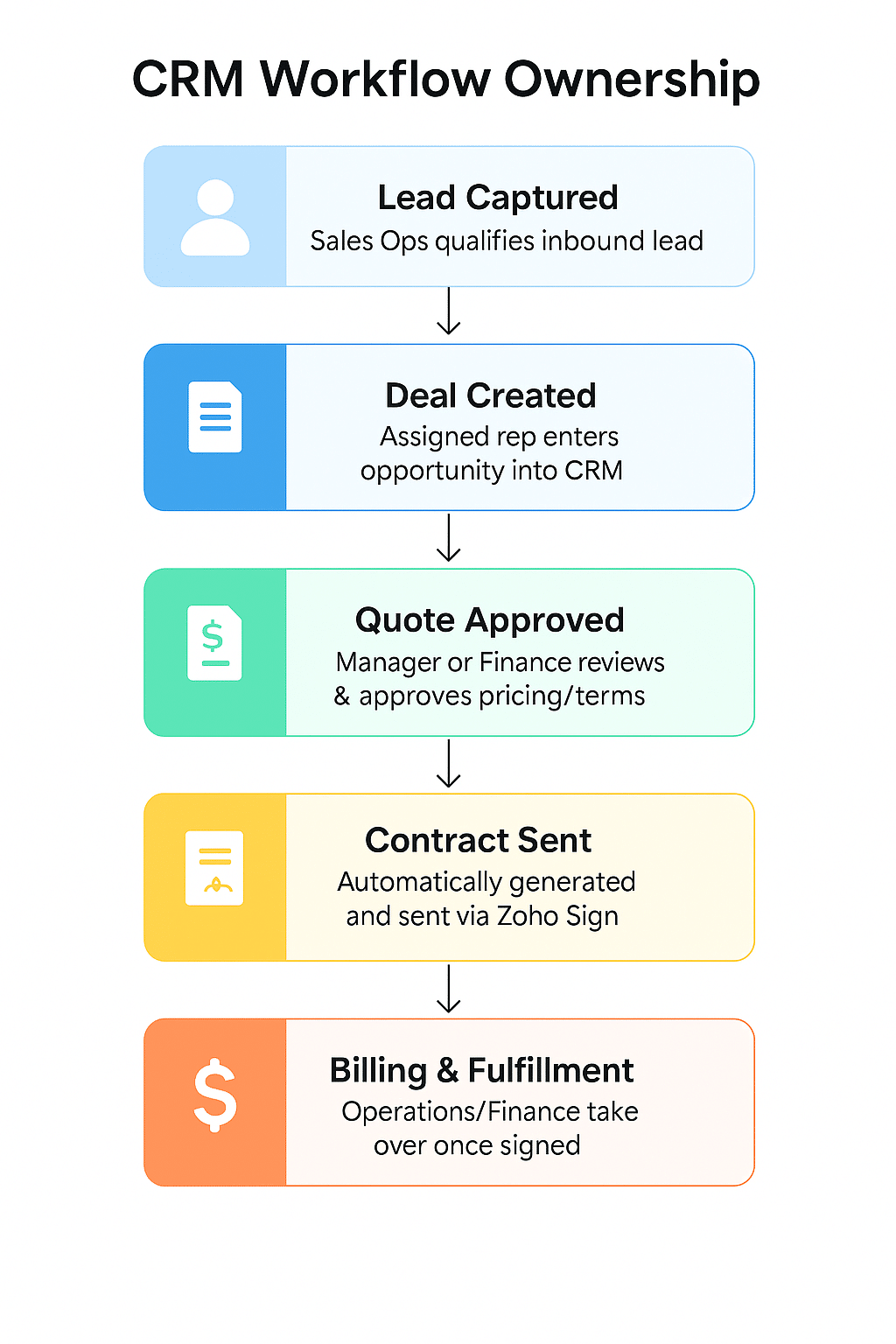
That checklist became the operational backbone of their system. Once responsibilities were defined, we layered in Zoho CRM’s role-based access controls for enforcement and tracking. Automation finally supported the team—rather than creating more friction.
Contracts Became Part of the Workflow — Not Just Paperwork
Before we got involved, the contract process was completely manual. Quotes were made in spreadsheets, contracts were emailed around for signatures, and fulfillment updates happened in Slack threads or not at all.
We helped the team shift to a cleaner, more predictable process:
-
Quotes were built from templates inside the CRM
-
Contracts were generated automatically and sent via Zoho Sign
-
The system updated the deal stage as soon as a contract was signed
-
Finance and fulfillment got notified without anyone needing to follow up
-
Every signed contract lived in the CRM, tied to the right deal
“We didn’t just generate contracts. We made them operational — with triggers, fields, and accountability baked in.”
With this in place, reps stopped wondering what came next. The system handled it.
We Made Territories Work the Way the Business Works
A lot of teams treat territory management as a reporting layer. But in this case, it needed to do more than that. Reps needed to know exactly which accounts they owned. Leads needed to route correctly. Managers needed to see pipeline by region.
So we helped the client implement territory logic based on geography and customer size — and then wired that into:
-
Lead routing rules
-
Account ownership assignments
-
Field permissions and layout visibility
-
Dashboards segmented by region and rep
To ensure best practices, we referenced Zoho’s official guide on using territories effectively — a resource that explains how to structure hierarchies, assign users, and align rules across the CRM.
We also leaned on Zoho’s Decision Guide for Territory Management to ensure our solution was both scalable and aligned with the client’s growth needs.
CRM Territory Management in Action
This short video from Zoho offers a clear, visual snapshot of territory management in practice—how territories are defined, assigned, and how they streamline ownership across teams.
“Territory isn’t just a sales map — it’s an operational model for routing, reporting, and rep accountability.” This helped the sales team focus on their patch—while ops and finance trusted the system to keep everything aligned behind the scenes.
We Built for the 80%, Not the Edge Cases
When you’re designing a CRM, it’s easy to get caught up in trying to handle every possible scenario. But complexity kills adoption — and adoption is what makes a system useful.
So we kept it simple.
We trimmed deal layouts down to just the essentials: close date, contract value, product category, main contact. We only automated transitions that reps actually controlled. And we set aside edge cases like enterprise deals or custom pricing to handle separately — not in the standard flow.
“If your CRM works for the edge case but fails for the everyday deal, you’ve already lost.”
The result? Reps started using the system. Managers got real visibility. And the team had a clear path to build on later.
The Shift: From Tools to Operations
By the end of the engagement, the conversation had completely shifted.
Before, leadership asked: “Is the CRM working?”
After implementation, they were asking the questions that actually move revenue forward:
-
How many quotes went out this week?
-
What contracts are still waiting on signatures?
-
What’s in the pipeline for each territory?
-
Which deals have triggered billing?
That’s the difference between installing a tool and building an operational system. When CRM is truly embedded into the workflow, it stops being a passive database and starts driving accountability across sales, marketing, and finance.
As Zoho points out in their guide to CRM adoption, success isn’t just about turning the system on—it’s about ensuring it becomes the backbone of how the business runs.
“We don’t measure success by whether the CRM is live — we measure it by whether the business is running smoother because of it.”
At CRM Experts Online, that’s our approach. We don’t just “launch” a CRM and walk away. We design systems that teams can trust, scale, and own, so leaders stop firefighting and start running operations with clarity.
???? You don’t just want to go live. You want operational excellence — and that’s where real momentum begins.
Transform Your Business with AI-Powered CRM Solutions
Discover custom-built CRM solutions designed to enhance efficiency, automate processes,
and improve customer experiences. Partner with CRM Experts Online for expert development,
implementation, and support.
Related Posts
-
What to Expect When Implementing a CRM System
Understand the common challenges businesses face right after go-live and how to prepare for long-term success. -
How to Define CRM Success Metrics for Your Business
Learn which KPIs matter most when measuring whether your CRM is truly driving adoption and growth. -
Top CRM User Adoption Challenges Solved by AI
Explore how technology helps overcome the most common barriers to CRM adoption and engagement. -
Best Practices for Real-Time Sales Workflow Monitoring
Discover how workflow visibility and monitoring help keep sales processes on track post-implementation.