
CRM data integration ensures all customer information – across sales, marketing, support, and billing – is unified in one system. This eliminates silos, improves collaboration, and reduces errors. Here’s how to do it effectively:
- Document Your Systems: Map out all tools and data flows, noting key details like field types, ownership, and PII.
- Prioritize High-Impact Integrations: Start with connections that enhance critical processes, like syncing customer data or automating order tracking.
- Clean Your Data: Remove duplicates, standardize formats, and validate information to prevent issues from spreading across systems.
- Choose the Right Integration Method: Options include APIs, middleware, batch processing, and webhooks – each suited for specific needs.
- Leverage AI: Automate field mapping, data syncing, and enrichment to save time and maintain accuracy.
- Roll Out in Phases: Test integrations on a small scale before full implementation to catch issues early.
Automate CRM Enrichment For Demo Requests (AI workflow)
sbb-itb-f02ae4e
Document Your Systems and Data Flows
Start by mapping out your data ecosystem. Create a comprehensive inventory of all systems handling customer data. This inventory should include key data objects like Contacts, Companies, Deals, Orders, Inventory, and Support Tickets. For each system, note essential details such as data ownership, volume and frequency patterns, latency requirements, and whether the system contains personally identifiable information (PII).
This documentation phase is critical – it often determines the success or failure of a project. Industry research indicates that 70% of a successful CRM integration project relies on planning, with only 30% involving technical execution [2]. As Trent Little from Evenbound explains: "Success isn’t determined by the software you buy; it’s determined by the blueprint you create before you ever click ‘connect’" [4]. During this process, you’ll uncover inefficiencies like manual workarounds and data silos. A thorough data inventory not only clarifies your current workflows but also sets the stage for smoother AI integration and automation. This groundwork is essential for accurate field mapping and effective integrations.
List Your Systems and Data Types
Develop a data dictionary to document how fields align across systems. Use the "Four-Column Rule" to guide your mapping: Source Field, Destination Field, Field Type, and Transformation Logic. For instance, a website form’s email_address field might map directly to your CRM’s Contact.Email field without changes, while first_name maps to Contact.FirstName with logic to capitalize the first letter. Clearly identify required destination fields, as missing data can disrupt synchronization.
Decide which system "owns" specific data entities to avoid conflicts. For example, your CRM typically manages relationship data and pipeline information, while your ERP handles financial data like invoices and payments. This ownership, often referred to as the "System of Record", ensures that multiple systems don’t overwrite each other, preventing data chaos. Use tools like whiteboarding to visualize your "Current State" (manual processes and spreadsheets) alongside your "Future State" (ideal automated workflows). This exercise highlights operational gaps and ensures your data flows seamlessly as you implement high-value integrations.
Focus on High-Value Integrations First
Start with integrations that have the greatest business impact. Prioritize connections that directly improve key processes, like customer master data and order status. High-impact integrations – such as automating the "order to cash" process – can quickly enhance cash flow and operational efficiency [6]. Begin with simple, unidirectional data flows (one-way syncs) to achieve quick wins before tackling complex, bidirectional integrations. For example, syncing new leads from web forms to your CRM or updating order statuses from your ERP to customer service tools can deliver immediate results with minimal technical hurdles.
Engage stakeholders from Sales, Marketing, and Customer Service to identify integration opportunities that provide the most value. By comparing the cost of manual processes to the cost of automation, you can calculate the potential ROI and prioritize efforts accordingly.
Clean Your Data Before Integration
Cleaning your data is a critical first step before integrating systems. It ensures that all subsequent workflows rely on accurate and consistent information. Dirty data spreads across systems like a virus. Problems such as formatting errors, duplicates, and outdated records can cascade through connected platforms, leading to what experts call "silent corruption" [9]. Starting with clean data sets the stage for smooth field mapping and dependable integrations.
The statistics paint a stark picture: about 90% of contact records in typical CRM systems are incomplete, and 20% are completely unusable [9]. On top of that, 30% of B2B contact information becomes outdated annually due to job changes and company restructuring [7][9]. If you skip the cleaning step, these issues not only persist but worsen over time. For example, web forms and system integrations have an 80% duplicate rate compared to just 19% for CSV imports [9].
Clean data doesn’t just make your systems more efficient – it directly affects your bottom line. Sales teams using verified CRM data can close deals 23% faster, and organized data drives 30% higher sales revenue by enabling precise, targeted outreach based on actionable insights [7][9]. Instead of wasting time hunting for correct contact information or deciphering outdated notes, your sales team can focus on building relationships. Additionally, clean data reduces email bounce rates, which can otherwise harm your sender reputation and lower inbox placement by 15% to 30% [9]. In 2023, bad data cost businesses 25% of their revenue across industries [8].
Remove Duplicates and Standardize Formats
Always back up your CRM data before starting any large-scale cleaning or merging tasks. ApexVerify emphasizes this point:
"The most expensive data cleaning mistake is the one you can’t undo. Always backup before you begin" [9].
Once your data is safely backed up, prioritize identifying duplicates using a mix of exact and fuzzy matching techniques. Exact matching can catch identical entries, like duplicate email addresses, while fuzzy matching identifies near-duplicates, such as "Bob Smith" and "Robert Smith" [9][10].
Standardizing formats is another key step to ensure your systems "speak the same language." For instance, phone numbers should include country codes (e.g., +1 for the United States), company names should follow consistent naming conventions (e.g., "Inc." versus "Incorporated"), and addresses should match postal standards [9][3]. Using dropdown menus instead of free-text fields for entries like state, industry, or country can prevent spelling variations at the source [7]. You can also implement validation rules to enforce specific formats, such as requiring valid email syntax or mandatory area codes, before data is even entered into your CRM [7][3]. These measures help avoid inconsistencies like "NY" versus "New York" that can fragment your data [10][3].
Use AI to Improve Data Quality
While manual cleaning methods handle basic errors, AI takes data quality to the next level by automating complex checks. AI can reduce manual data entry and correction tasks by 41% [7][9], identifying duplicates, filling in missing fields, and validating information in real time. For example, AI-powered enrichment tools can instantly pull publicly available details – like job titles, company sizes, or revenue figures – from platforms like LinkedIn when a new contact is added [7].
AI also excels at deduplication, using techniques like fuzzy matching and phonetic similarity to catch variations such as "Jon Smyth" versus "John Smith" or "Google Inc." versus "Google" [11][12][13]. Real-time validation ensures that data – like email addresses and phone numbers – is accurate at the point of entry, stopping bad data before it enters your system [12][13]. The rise of "self-cleaning" CRM systems means that AI can continuously monitor your records, addressing data decay as it happens rather than relying on periodic cleanup projects [12][13].
Choose the Right Integration Method
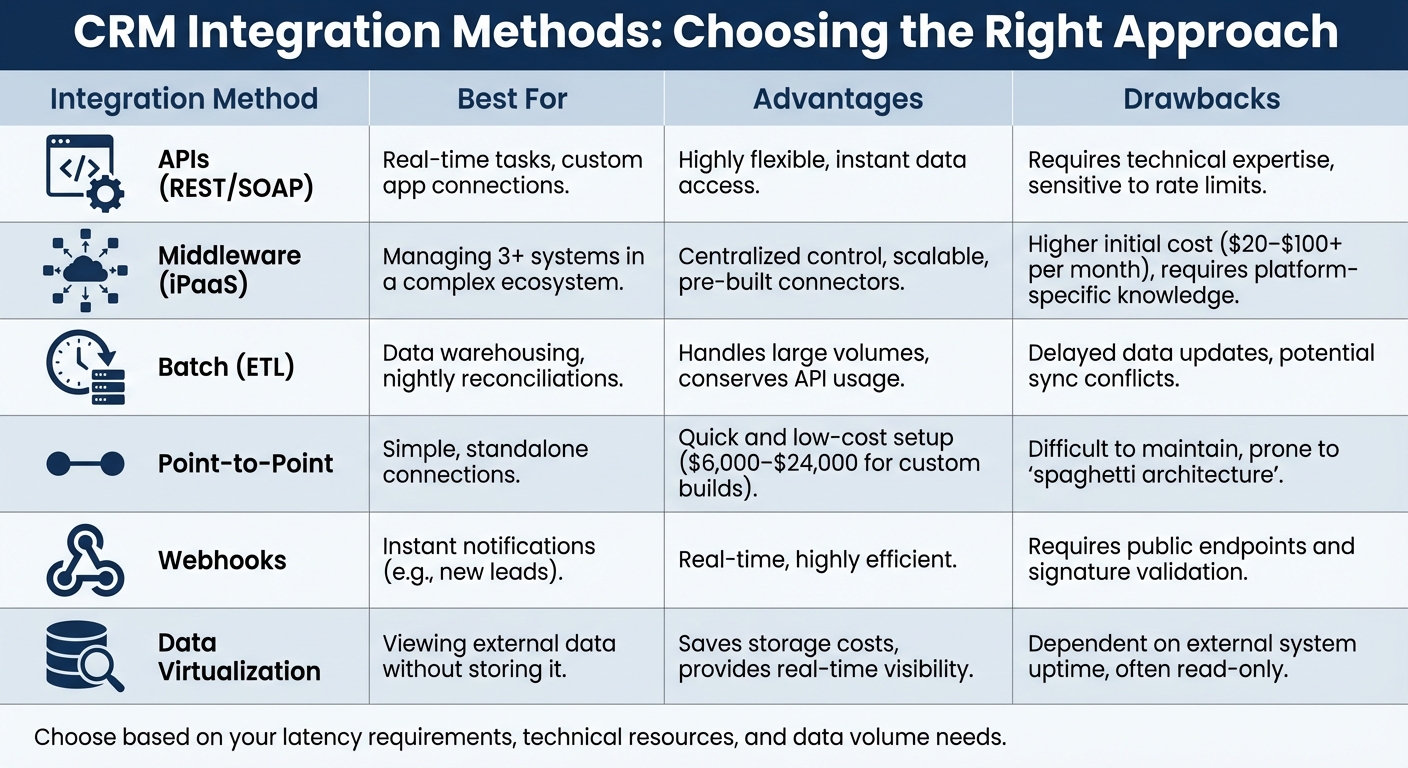
CRM Integration Methods Comparison: APIs, Middleware, Batch Processing, and More
Once you’ve documented your systems and defined your data flows, the next step is selecting the best integration method. This decision can significantly impact your CRM’s performance. As Jagrat Maheshwari, CTO at Cyntexa, explains:
"Choosing the right integration pattern is the most important technical decision you make for successful Salesforce integration." [14]
Your choice of integration method directly affects how quickly data syncs and what it costs to maintain. There’s no universal solution – it all depends on your specific requirements, available technical resources, and how quickly data needs to move between systems. For example, a real-time API connection is ideal for routing leads instantly but might be overkill for syncing historical data once a day.
Before diving into integrations, compare your current workflow with your desired outcome. Trent Little from Evenbound highlights the importance of preparation:
"Success isn’t determined by the software you buy; it’s determined by the blueprint you create before you ever click ‘connect’" [4].
Latency requirements are another critical factor. If your sales team needs to see new leads within seconds, real-time integration is essential. On the other hand, batch processing is better suited for tasks like reconciling financial data at the end of the day – it’s resource-efficient and conserves API quotas. Keep in mind that simple integrations, such as email syncing, typically take 1–2 weeks to implement, while more complex integrations involving multiple systems can take 3–6 months [15]. These timelines should be factored into your rollout strategy as you weigh costs, speed, and scalability.
Compare Integration Methods
Each integration method has its strengths and weaknesses, and understanding these trade-offs can save you from costly missteps. For instance, while point-to-point connections are quick and affordable to set up, they can result in "spaghetti architecture" – a tangled mess that’s nearly impossible to manage as your tech stack grows [14]. Middleware platforms, on the other hand, come with higher upfront costs but offer better scalability and centralized control.
Real-time integrations are API-intensive, so if you’re handling large data volumes, a near-real-time approach (syncing every 1–30 seconds) can strike a balance. This method delivers the speed most operations need while avoiding the infrastructure demands of millisecond-level synchronization. For tasks that aren’t time-sensitive, like analytics or nightly reconciliations, batch processing is a more efficient option that minimizes API usage.
| Integration Method | Best For | Advantages | Drawbacks |
|---|---|---|---|
| APIs (REST/SOAP) | Real-time tasks, custom app connections | Highly flexible, instant data access | Requires technical expertise, sensitive to rate limits |
| Middleware (iPaaS) | Managing 3+ systems in a complex ecosystem | Centralized control, scalable, pre-built connectors | Higher initial cost ($20–$100+ per month), requires platform-specific knowledge [15] |
| Batch (ETL) | Data warehousing, nightly reconciliations | Handles large volumes, conserves API usage | Delayed data updates, potential sync conflicts |
| Point-to-Point | Simple, standalone connections | Quick and low-cost setup ($6,000–$24,000 for custom builds) [15] | Difficult to maintain, prone to "spaghetti architecture" |
| Webhooks | Instant notifications (e.g., new leads) | Real-time, highly efficient | Requires public endpoints and signature validation |
| Data Virtualization | Viewing external data without storing it | Saves storage costs, provides real-time visibility | Dependent on external system uptime, often read-only |
Each method serves a different purpose, so the key is aligning your integration strategy with your specific business needs and long-term goals. Balancing cost, complexity, and speed will help ensure a solution that works for you now and scales as your operations grow.
Use AI to Automate Workflows
Once you’ve selected an integration method, it’s time to let AI take the reins. Did you know that 28% of a sales rep’s time – more than a full day each week – is spent on manual data entry? [21]. AI-powered automation can handle tasks like field mapping, data syncing, and enrichment, freeing up your team to focus on what they do best: selling.
AI tools now autonomously gather data from emails, calendars, and call transcripts [17]. This means your CRM stays updated with the latest customer interactions, without anyone needing to manually input information. Companies that integrate AI with their CRMs are seeing 15-20% increases in win rates and 30% faster onboarding for new sales reps [19]. These gains come from the speed and accuracy AI brings to managing data, ensuring your team always has access to reliable, up-to-date information.
Automate Field Mapping and Data Syncing
AI can also step in to simplify field mapping and syncing, a process that often causes headaches due to inconsistencies. For example, your CRM might label a field "Customer Name", while your ERP system calls it "Vendor Name." AI algorithms analyze patterns in your data to suggest the best field mappings and standardize formats, such as converting phone numbers into the E.164 format, reducing the need for human intervention [1].
By standardizing data at the point of entry, AI eliminates common inconsistencies. For instance, phone numbers might appear as "(555) 123-4567" in one system and "555-123-4567" in another. Similarly, AI can recognize that "Google Inc." and "Google" are the same entity, preventing duplicate records – which can account for up to 20% of entries in manual systems [16].
Real-time, bi-directional syncing ensures that updates are reflected instantly across your CRM and other tools. For example, when a sales rep schedules a meeting in Google Calendar, AI logs the activity in your CRM immediately [20]. Contact details, email threads, and meeting notes all sync seamlessly. This real-time syncing is growing at a compound annual rate of 28.3%, far outpacing the 17.1% growth of traditional batch processing [16].
AI can even join video calls on platforms like Zoom, Teams, or Google Meet, where it records and transcribes conversations. These tools can create summaries, draft follow-up emails, and update deal stages based on the discussion [17]. With 71% of sales reps spending too much time on manual data entry, AI meeting bots can save your team 8 to 12 hours per week – time they can redirect to closing deals [17].
Connect Your CRM with Business Tools
AI doesn’t just improve internal workflows; it also bridges gaps with external tools. By linking your CRM to email, calendars, and marketing platforms, AI creates a unified system that eliminates silos. For instance, AI enrichment tools can pull in firmographic details like company revenue, employee count, industry, and tech stack from sources like LinkedIn and business databases. This means your sales team gets fully fleshed-out contact profiles without lifting a finger [13].
For dynamic fields like "Last Visit Date" or "Engagement Score", AI ensures these are always up-to-date [18]. For static data like job titles or company size, you can use "Fill If Empty" logic to prevent AI from overwriting manual corrections [18]. By setting confidence thresholds at 70% or higher, you can ensure AI only syncs new contacts or companies when it’s confident in the match [18].
Before deploying any AI-powered integration, it’s a good idea to run a "10-Record Test" in a sandbox environment [4]. By manually triggering a sync for a small sample, you can confirm that field mappings and transformation logic are working as expected. This simple step helps catch issues early, saving you from costly cleanup efforts later. Combined with best practices, these tools transform your CRM into a real-time intelligence hub, giving your team the insights they need to succeed.
Roll Out Integrations in Phases
Once you’ve established clean data and optimized AI workflows, rolling out CRM integrations in phases is the smart move. Trying to implement everything at once can lead to chaos. In fact, 40% of CRM projects fail due to poor data preparation and planning [22]. A phased rollout allows you to test and tweak the system before scaling it organization-wide. This way, you can catch technical issues early, train your team gradually, and achieve small wins that keep stakeholders motivated.
A parallel rollout ensures daily operations run smoothly [22]. Your team can get hands-on with the new system while still relying on familiar tools. This controlled setup helps you spot data mismatches, fix field mapping issues, and collect feedback for future phases. It’s a method that increases sales productivity by 30% while ensuring GDPR compliance [22]. By minimizing risks, this approach creates a solid foundation for ongoing success.
Start with Preparation and Quick Wins
The first step is to take a detailed inventory of your data and ensure its quality. Identify duplicates, catalog systems, and standardize formats before syncing anything. Next, focus on automating high-volume, repetitive tasks like lead capture, appointment scheduling, and follow-up emails. Automating these processes can lead to a 30% increase in conversions and a 25% reduction in sales cycle time [22]. For service-based businesses, this strategy can save over 10 hours per week [22].
To avoid mass data corruption, run a "10-record test" in a sandbox environment that mirrors production. This small-scale test ensures accurate field mapping and data transformation before a full sync [4]. As Trent Little from Evenbound explains:
"Success isn’t determined by the software you buy; it’s determined by the blueprint you create before you ever click ‘connect’" [4].
Scale Up with AI and Monitoring Tools
Once you’ve secured early wins, it’s time to expand. Gradually introduce AI features and extend the integration to additional departments. Use real-time monitoring tools to keep track of API response times, error rates, and sync volumes. Set alerts for sync delays over 15 minutes or error rates above 2% [1]. For the first 60 days, review key performance metrics weekly to address issues quickly and maintain progress [23].
Companies that follow these best practices for AI-CRM integration often see 15-20% improvements in win rates and achieve forecast accuracy over 95% [19]. To keep your system running efficiently, schedule quarterly updates and performance reviews during low-usage times [1].
Build Cross-Department Workflows
Once you have clean, AI-enhanced data in place, the next step is creating unified workflows that connect your CRM to every corner of your business. A well-integrated CRM should act as the hub for sales, marketing, and customer service, ensuring that all departments operate seamlessly on shared customer data. It’s worth noting that 81% of IT leaders believe data silos slow down their digital transformation efforts [27]. By building cross-department workflows, you can eliminate these silos and create a more cohesive CRM system.
For example, companies that sync their CRM with marketing tools report 42% shorter sales cycles and 28% higher close rates [25]. Here’s how it works: marketing captures a lead, sales instantly accesses the lead’s engagement history, and once the deal is closed, customer service gains immediate visibility into purchase details and conversation notes. This eliminates the need for repetitive back-and-forth, saving time and reducing errors.
Enable Two-Way Data Sharing
Two-way synchronization ensures updates flow automatically between systems, keeping everyone on the same page. For instance, when a support agent resolves a ticket, the sales team can see it in real-time. Similarly, if a sales rep updates a contact’s job title during a call, marketing can use that information for better segmentation.
To maintain data integrity, apply sync logic tailored to each type of data. For static fields like job titles, use a "fill if empty" rule to avoid overwriting manual corrections [18][4]. For dynamic fields, such as last visit dates or intent scores, opt for an "always update" rule to ensure everyone has the latest information [18]. Additionally, instead of pushing territory or account ownership data into the CRM, pull it directly from the CRM. This approach ensures your existing routing rules remain accurate and authoritative [18].
Before rolling out these syncs across the board, test them with a small, diverse data set. Use a sample of 10 records, including a new lead, an existing customer, and a record with unusual formatting, to verify that everything syncs correctly [4].
Monitor Data Quality with Dashboards
Dashboards tailored to specific roles help teams focus on the metrics that matter most to them. For example, marketing can track lead engagement and conversion rates, sales can monitor pipeline velocity and deal stages, and customer service can keep an eye on case resolution times and satisfaction scores. This targeted approach is crucial, especially when the average sales rep spends only 35% of their time actually selling, with the rest eaten up by administrative tasks [24]. Dashboards cut down on these inefficiencies.
Set up role-specific dashboards and real-time alerts to monitor key metrics like duplicate records, field completion rates, and contact accuracy. Platforms like Slack or Microsoft Teams can deliver instant alerts about high-priority activities, such as a high-intent visitor or a data quality issue.
Given that only 35% of sales professionals trust their company’s data [26], it’s essential to conduct quarterly audits of integration logs and data quality metrics. These audits help prevent technical debt from piling up and ensure your cross-department workflows remain reliable and aligned with your business goals [26][5].
Work with CRM Experts Online for Custom Integrations
Once you’ve set up solid integration workflows, working with CRM experts can help you take things to the next level. By bringing in specialists, you can ensure your solutions are not only tailored to your needs but also scalable for future growth. Complex CRM data integrations – especially those involving AI-driven automation and cross-platform syncs – require a deep understanding of technical architecture and your industry’s specific challenges. With the right expertise, your CRM system can go from just functional to a tool that delivers measurable business outcomes. In fact, custom CRM solutions can increase ROI by over 245% when they align seamlessly with your business processes[28].
Custom CRM Solutions
CRM Experts Online specializes in creating workflows that fit your unique business operations. Their team manages implementations for major platforms like Salesforce, Zoho, Microsoft Dynamics, and NetSuite. These integrations ensure smooth communication between your CRM and other essential tools, such as ERP systems, QuickBooks, and marketing automation software[28]. This approach can cut manual data entry by up to 50%, giving your team more time to focus on tasks that drive value[28].
They go beyond basic data syncing by offering AI-powered features like predictive lead scoring, automated field mapping, and sentiment analysis to better anticipate customer needs[28][29]. For lead generation, their SmartCrawl AI tool uses robotic process automation (RPA) to scan LinkedIn for real-time, industry-specific prospects[31]. Their agile process includes system analysis, design, implementation, and ongoing support, ensuring that your CRM evolves alongside your business needs[30].
Support Plans and Services
CRM Experts Online provides three levels of support to match varying needs:
- Comprehensive Support Plan: For $4,500 per month, you get a dedicated team, unlimited training, and quarterly audits to keep your integrations running smoothly[33].
- Managed Support Plan: At $1,300 per month, this plan includes a shared project manager, quarterly training, annual audits, and a 12-hour response time[33].
- Self-Guided Plan: Priced at $250 per month, this basic option offers access to an online knowledge base, 24-hour response times, and essential support[33].
All plans come with rollover hours, so you never lose unused support time as long as your subscription remains active[33]. Comprehensive plan members also enjoy perks like free access to CRM Experts Software and AI Employee deployment for automating business processes[31][32]. Across all service tiers, 24/7 AI and ticket support ensure fast response times ranging from 4 to 24 hours, giving you the technical assistance needed to maintain efficient, high-performing workflows[31][33].
Conclusion
Getting CRM data integration right starts with ensuring your data is clean and well-organized. Without clean data, you risk the "garbage in, garbage out" scenario, which impacts 90% of marketing campaigns[34]. A phased approach – beginning with assessment, moving to strategic field mapping, and scaling with AI-powered automation – can significantly improve lead quality and qualification rates[18].
The integration method you choose plays a big role in success. Manual uploads are fine for one-off migrations, but for real-time, two-way syncing, API-first and iPaaS solutions are the way to go. Using incremental data loading instead of full system refreshes reduces strain, while setting an error-alert SLA of five minutes or less ensures smooth operations[1].
AI tools take workflow management to the next level by enabling smarter field mapping, real-time data enrichment, and predictive quality monitoring. When all departments rely on a single source of truth, collaboration improves. Regular maintenance and audits keep your data reliable over time[1].
For businesses facing complex challenges, CRM Experts Online offers tailored solutions. Their AI-driven tools reduce manual data entry, allowing your team to focus on revenue-generating tasks. With support plans starting at $250 per month and advanced solutions available for $4,500 per month, they provide scalable options to meet your needs.
FAQs
How do I choose the system of record for each data object?
To determine the best system of record for each data object, focus on the source that provides the most accurate, complete, and current information. Take into account factors like data quality, how often the data is updated, and the reliability of each system. Before rolling it out fully, test and fine-tune data flows to confirm the correct system is assigned and inconsistencies are avoided. This process helps maintain consistent, accurate customer insights and ensures seamless data integration.
When should I use real-time sync vs batch sync?
When real-time sync is essential, such as during sales processes, customer interactions, or support scenarios, it ensures data updates happen instantly and accurately. This approach keeps everything up-to-the-minute but often requires strong infrastructure and security measures to handle the constant data flow.
On the other hand, batch sync works best for tasks that aren’t time-sensitive, like generating reports or managing data warehouses. It processes data in chunks at scheduled intervals, which helps reduce strain on systems. However, the trade-off is a delay in updates, making it unsuitable for situations where immediacy is key.
How can I prevent bad data from spreading after integration?
To avoid the spread of bad data following a CRM integration, it’s crucial to approach data management with care. Start by thoroughly cleaning your data before integration and putting validation measures in place. Key actions include conducting regular audits, removing duplicate entries, and establishing clear data quality standards. By standardizing inputs and addressing any inconsistencies early on, you can significantly reduce errors. After the integration, ongoing monitoring and validation are vital to ensure your data remains accurate and consistent over time.
Related Blog Posts
- CRM Data Migration Guide: Best Practices and Tips
- 5 Common CRM Integration Problems and Their Solutions
- CRM-ERP Integration: Workflow Automation Benefits
- Best Practices for CRM-ERP API Integration

CRM & ERP Enterprise Technology Expert and Entrepreneurial Executive with 20+ years of leading CRM, ERP, Customer Experience, and Block-chain initiatives and projects across internal and customer facing technologies. Proven success in closing large deals in Pre Sales customer facing engagements and deploying enterprise wide CRM & Customer Experience solutions internationally and domestically.