
Most personalization fails for one simple reason: your customer data, timing, and team actions don’t line up. If I want AI personalization to work, I need one customer view, live triggers, channel coordination, and rules that stop bad messages before they go out.
Here’s the short version:
- I start by cleaning and unifying customer data across CRM, support, billing, and web tools.
- I use dynamic segmentation so people move based on live behavior, not old lists.
- I apply next-best-action scoring to decide what should happen next.
- I deliver that decision through real-time recommendations on web, app, email, or service channels.
- I use orchestration and event triggers so timing matches customer intent.
- I personalize content, offers, and service replies with rules, templates, and AI agents.
- I measure incremental lift, not just clicks or sends.
- I add governance, consent checks, audit logs, and human review where risk is high.
A few numbers make the case clear: companies strong in personalization can drive 40% more revenue from those efforts, segmented campaigns can produce 760% more revenue than non-segmented sends, and triggered messages can convert at 624% higher rates than batch blasts.
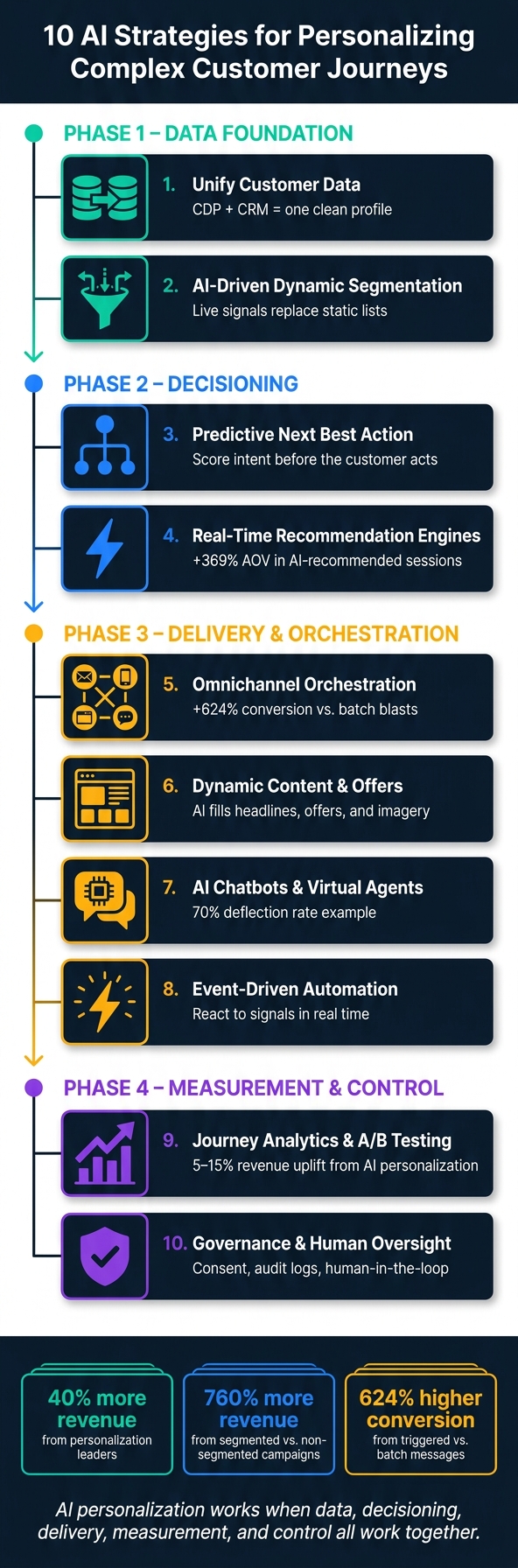
10 AI Strategies for Personalizing Customer Journeys
Masterclass: Designing personalised customer experiences with AI
sbb-itb-f02ae4e
Quick Comparison
| Strategy | What it does | Main goal |
|---|---|---|
| Data unification | Merges customer records into one profile | Better inputs for AI |
| Dynamic segmentation | Updates audiences from live signals | Better timing and targeting |
| Next best action | Picks the next move | Better decisioning |
| Real-time recommendations | Shows the right offer or message now | Better in-session relevance |
| Omnichannel orchestration | Syncs actions across channels | Fewer mixed messages |
| Dynamic content and offers | Personalizes copy, products, and promos | Better message fit |
| Chatbots and virtual agents | Handles service with CRM context | Faster issue handling |
| Event-driven automation | Reacts to behavior instantly | Better journey timing |
| Journey analytics and testing | Measures lift and tests variants | Better proof of impact |
| Governance and oversight | Applies rules, consent, and review | Lower risk |
If I had to boil the article down to one point, it’s this: AI personalization works when data, decisioning, delivery, measurement, and control all work together.
Why Personalization Fails in Complex Customer Journeys
Personalization tends to fall apart for a few plain reasons: customer data lives in too many places, teams work apart from each other, and systems move too slowly. The problem usually isn’t lack of effort. It’s orchestration.
Here are the failure points that show up most often, and what they cost:
| Symptom | Root Cause | What Breaks |
|---|---|---|
| Customer appears as multiple records | Disconnected CRM, billing, and support systems | Incomplete profiles, unreliable AI |
| Offers sent too late | Batch data pipelines with 24-hour update cycles | Irrelevant offers, missed intent |
| Promotions sent during service issues | Marketing and service teams working in silos | Trust erosion |
| Generic content at scale | Manual content production | 1:1 personalization doesn’t scale |
| Compliance slows activation | Manual consent and audit checks | Slow, outdated messaging |
These breakpoints line up directly with the AI controls in the next section: data, decisioning, orchestration, content, service, analytics, and governance.
Disconnected Customer Records Across Systems
A typical enterprise keeps customer data across 15 to 25 separate systems [2]. That means one person can show up as several different records: one in the CRM, one in billing, and another in support.
When that happens, identity resolution gets shaky. And if the underlying profile is incomplete, AI decisions start to drift too. Put simply, messy records lead to weak personalization.
Static Segments in Fast-Moving Journeys
Fixed audience lists look neat on paper, but they rely on past behavior. Customer intent doesn’t sit still. It changes fast.
So by the time a list refreshes, the signal that mattered may already be gone [9]. That’s the trap: you’re acting on yesterday while the customer is making choices today.
Channel and Team Silos
When marketing, sales, and service each use separate tools and track separate KPIs, the customer gets a broken experience. A person might contact support with a problem, then get a promotion a few minutes later [1] [7].
That kind of mismatch doesn’t just look sloppy. It chips away at trust.
Poor Timing and Trigger Logic
Many organizations still depend on batch data pipelines that refresh once per day [9]. In a slow-moving process, that may seem fine. In customer journeys, it’s often too late.
Batch updates miss intent signals like cart abandonment or repeat visits, so the response lands after the moment has passed [9] [11]. It’s a bit like showing up to catch a flight the next morning.
Compliance and Approval Bottlenecks
In regulated U.S. industries like healthcare, financial services, and education, personalization runs into another barrier: compliance. Under CCPA, teams can only act on data that’s explicitly permitted [10] [1].
That puts pressure on every campaign, trigger, and message. If consent checks and audit checks are still manual, activation slows down and messaging gets stale. In those cases, the issue isn’t just policy. It’s workflow.
The first fix is not more content. It’s cleaner data and faster decisioning.
1. Unify Customer Data With AI-Ready CRM and CDP Architecture
The fix starts with unified data. AI can only personalize well when it has a full customer profile to work from.
A Customer Data Platform (CDP) tied to your CRM brings identity, behavior, purchase, and service data into one profile. Without that setup, even a sophisticated AI model can send the wrong offer or serve content that feels off. That single profile then drives next-best-action decisions, content choices, and offer selection. It also supports the dynamic segmentation, recommendations, and orchestration that come next.
It also helps to add zero-party data, which is the information customers share on purpose, like preferences and intent. 83% of consumers are willing to share zero-party data if it leads to a personalized experience [1]. A simple way to collect it is through progressive profiling: ask one high-value question per visit instead of pushing a long form all at once. You get richer profiles without making the experience feel like a chore.
Before you connect AI to any of this, check your data quality. Audit each source, map the schema, review refresh timing, and dedupe records before AI goes live. CRM Experts Online provides CRM development, implementation, consulting, and support for AI-ready data and workflows.
2. Use AI-Driven Segmentation for Dynamic Journey Paths
Once you have unified customer data, AI can shift people into new segments as their behavior changes. Static lists can’t do that. They miss live intent. Someone who visits your pricing page again and again is showing a lot more urgency than someone who stopped by once and left.
AI-driven segmentation solves this by re-scoring and reassigning customers as new signals come in. Instead of building manual lists around broad rules, the system reads live behavior, CRM and support history, preferences, sentiment, and lifecycle stage in real time.
HubSpot reports that segmented campaigns generate 760% more revenue than non-segmented sends [1], and predictive targeting can lift conversion rates by 20% compared with demographic-only targeting [3]. That matters because this isn’t only about tighter targeting. It’s about getting the right message to the customer at the right moment.
You can use a few core signals to power dynamic segments:
- Website and app behavior, especially high-intent page views like pricing or cancellation
- CRM interaction history
- Active support tickets
- Purchase and usage data
- Zero-party preferences that customers share directly
Then connect each signal to a clear journey move. Pricing-page visits can trigger sales outreach. Unresolved tickets can pause promotions. Usage drops can kick off retention flows. If someone is browsing cancellation pages, they need a retention response, not an upsell. That’s the whole game: read the signal, then change the path.
Segment membership should shape what happens next. It should decide what content a customer sees, which channel reaches out, what offer they get, and whether the response comes from a person or an automated system. One B2B SaaS company used AI lead scoring across 40+ behavioral signals and saw a 30% improvement in lead-to-close conversion [3]. Those live segments then feed next-best-action decisions in the next strategy.
3. Apply Predictive Analytics for Next Best Action
Once segments update in real time, NBA decides what should happen next. A next-best-action model looks at live behavioral, transactional, and service signals, then weighs them against business constraints to pick the action with the highest chance of working in that moment.
The big change is simple: instead of waiting for events, you try to get ahead of them. Standard orchestration waits for something to happen – like cart abandonment – and then reacts. Predictive NBA does the scoring first. It scores each customer profile for churn risk and purchase probability before the customer acts. That changes personalization from reactive messaging into proactive decision-making. And the decision gets better when the model reads intent, not just past behavior.
NBA works best when it reads several signals at the same time. Behavioral signals matter. For example, browsing velocity can say a lot: three pricing-page visits in an hour show more intent than one visit [1]. Service data matters just as much. A frustrated support ticket should suppress the standard sales email and route the account to a human success manager [1]. Add in transactional history and operating limits like margin floors or inventory levels, and the model has enough context to choose a more relevant action.
In early 2026, Sandler used AI agents with live CRM context to personalize outreach, cutting sales cycle time by 50% [1].
One practical guardrail is confidence thresholds. If the model isn’t sure, it’s better to fall back to a neutral action or ask one clarifying question [5]. That’s common sense. A bad recommendation makes the brand look out of touch and chips away at trust. From there, the score can guide the message, offer, or handoff delivered in the next stage.
The next step is delivering that action through real-time recommendations at each journey stage.
4. Deploy Real-Time Recommendation Engines at Key Journey Stages
Predictive next-best-action logic decides what to do. Real-time recommendation engines put that choice in front of the customer right away, based on live signals like page views, app activity, and session duration. A decisioning layer uses machine learning plus business rules to pick the best content, offer, or service path. In short, next-best-action picks the move, and the recommendation engine shows it in the moment.
That decisioning layer brings together propensity scoring, journey sequencing, and optimization models with business rules such as inventory levels and margin floors [13] [4]. It can also shift from sales to service when the moment calls for it. For example, it might route a frustrated customer to a human agent or show a setup guide instead of a sales pitch [12] [5].
BSH Group shows how this works in practice. If a customer left a specific product page without moving forward, the next email answered questions about that exact product. That change led to higher add-to-cart rates [5].
There’s a big upside here. Sessions where customers interact with AI-generated recommendation modules show a 369% increase in average order value (AOV) compared with sessions that don’t include recommendations [3].
A good place to begin is where people already drop off most:
- Cart abandonment
- Onboarding friction points
From there, pass the recommendation into your orchestration layer so email, in-app, and service follow-ups stay in sync. Once that response moves across channels, orchestration becomes the next part of the job.
5. Orchestrate Omnichannel Journeys With AI-Powered Workflow Engines
Once next-best-action picks what to do, orchestration handles where, when, and how that action shows up. That’s the hard part. It’s one thing to make a smart decision. It’s another to keep that decision lined up across email, web, app, and service chat.
That’s where AI-powered workflow engines come in.
Modern orchestration does more than run basic if/then logic. These engines watch live behavior and sentiment, then pause, delay, or reroute actions in real time. So if a customer signals frustration, the system doesn’t keep pushing the same campaign like nothing happened.
One rule matters a lot here: suppression. If someone has an open service issue, that issue should block outbound messaging across every channel, not just one. Use suppression rules to stop outbound campaigns until the service issue closes [4].
The performance data makes this hard to brush off. Triggered messages – sent because of a specific customer action – drive a 624% higher conversion rate than standard blast emails. And organizations that do journey orchestration well report revenue gains of 10% to 20% along with cost cuts of 15% to 25% [6].
A smart way to begin is simple:
- Audit your real-time data coverage across channels before you automate anything.
- Make sure the engine is getting clean, unified signals.
- Pilot orchestration on one messy handoff, like the move from sales to onboarding.
If the data isn’t clean, even advanced orchestration logic will misfire. Garbage in, garbage out – it’s that simple. Start with one high-friction moment, get it working, then expand across the customer lifecycle.
Once channels are in sync, the next move is to adjust the content and the offer itself.
6. Power Dynamic Content and Offers With AI Rules and Templates
The hard part that remains is matching each message to the customer’s stage, behavior, and channel.
A smart way to handle that is with modular templates. Lock the legal and brand copy in place, then let AI fill in the headline, product details, offer, and imagery. The fixed fields help protect compliance. The dynamic fields make the message more relevant. That setup lets AI personalize one-to-many campaigns without rebuilding every asset from scratch.
At scale, this matters a lot. Templates let AI personalize millions of offers without reworking entire campaigns. Kroger, for example, uses machine learning to deliver personalized offers across 150 million customer touchpoints and distributes 1.9 billion unique coupons each year [14].
Offer personalization also needs guardrails. AI should work only within approved margin, inventory, and confidence limits. Put margin floors and inventory awareness directly into the decision rules, and you reduce the risk of over-discounting or promoting items that don’t match available stock [4].
Generative AI also helps with the creative bottleneck. Klarna used AI for 80% of its copywriting and saved $6 million in image production costs, which let the company run more personalized campaigns at the same time [14]. From there, you can carry the same rules into chat and virtual agents across service journeys.
7. Add AI Chatbots and Virtual Agents to Service Journeys
Chatbots do their best work when they pull from live CRM and backend data, not canned scripts. Connect virtual agents to order, subscription, and inventory systems through APIs so they can fix problems instead of just sending people somewhere else. That changes the experience in a big way. A customer gets a direct answer like, "Your package is in Memphis", instead of a bland link to the shipping policy.
The same customer profile and decision rules should shape service replies too, not only marketing messages. If your systems are connected, the bot can respond with context instead of guessing.
Unified CRM and service data make those replies context-aware at scale. When a virtual agent can see support ticket status, recent page views, and sentiment signals in real time, it can adjust the conversation to fit what the customer is dealing with right now. Camp Network achieved a 70% deflection rate in 2026 by training Breeze AI on its knowledge base and connecting it to live service data, freeing human agents for complex cases [1].
Escalation logic matters just as much as issue resolution. AI should track sentiment through the whole conversation. If negative sentiment shows up, the bot should step aside and send the customer to a human specialist with the full transcript and a short summary of what has already been tried. That helps stop bot loops and saves people from explaining the same problem all over again. The handoff should stay tied to the same profile and interaction history used across the journey.
Compliance needs the same level of care. Redact personal data before it reaches the model. Set minimum confidence thresholds so the AI either asks a follow-up question or routes the case to a human when certainty gets too low. Use Retrieval-Augmented Generation (RAG) to ground answers in approved content and keep them auditable [15]. Those same event signals can also trigger downstream automation.
8. Enable Hyper-Personalization With Event-Driven Automation
Once orchestration defines the path, event-driven automation handles the next move in real time. The action happens the second a meaningful signal changes, whether that’s a spike in pricing-page activity, a deal-stage change, or a seven-day drop in engagement.
The table below shows how trigger types connect to specific AI-orchestrated actions across the journey [1]:
| Trigger Category | Event / Signal | AI-Orchestrated Action |
|---|---|---|
| Acquisition | IP-to-company identification | Change the headline to match the visitor’s industry |
| Consideration | Pricing page visited 3x in one hour | AI-assisted outreach or targeted discount offer |
| Sales | No reply for 7+ days + high-intent browsing | Draft a context-aware follow-up email |
| Onboarding | Deal stage moves to "Closed-Won" | AI passes a clean handoff to onboarding |
| Retention | Usage gap: a key feature is ignored | Trigger a proactive in-app resource or CSM follow-up |
After the triggers are live, the next job is simple: track which ones actually change conversion, retention, or speed. Not every signal deserves an instant reaction. Some do. Some just add noise.
Two guardrails matter most. First, use suppression rules. If a customer has an open high-priority support ticket, pause promotional messages until the issue is fixed [10]. That keeps the experience from feeling tone-deaf. Second, keep identity data clean. Bad identity data leads to broken triggers and poor timing [8].
These event logs also feed the experimentation and journey-analytics layer in the next strategy.
9. Use AI-Assisted Journey Analytics and A/B Testing at Scale
Use trigger data to measure lift, not just activity. That’s the point where analytics becomes your next control layer: it shows which triggers drive actual change. AI-assisted journey analytics turns trigger data into something you can act on. It looks across channels and shows which messages, paths, and touchpoints move conversion, retention, and speed. Companies using AI-driven personalization have seen revenue uplifts of 5–15% [8].
The big shift is measuring lift, not exposure. Uplift modeling estimates the incremental effect of a specific message or touchpoint for each user. So instead of knowing a touchpoint appeared somewhere in the journey, you know whether it changed the outcome [8]. Pair that with multi-arm AI optimization. Instead of running a simple A/B test and waiting, it runs hundreds of micro-tests across audience segments and variants at the same time, then surfaces the winning combinations in real time [3].
Once you can measure lift, you need controlled tests to prove which variant caused it. At scale, testing can get messy fast. A few ground rules help keep things clean:
- Use a centralized test registry so marketing, product, and CRM teams can check active experiments before launching another one.
- Pick one test unit – user, account, or session – and keep it fixed for the full test.
- Block overlapping audiences from entering competing tests at the same journey stage.
- Pre-register the success metric, minimum lift, and stop conditions before the test goes live.
Focus on metrics that show whether the journey changed behavior, not just whether it fired. These KPIs help you see incremental impact across the full journey:
| Metric Category | Key KPI | What It Reveals in Journey Analytics |
|---|---|---|
| Conversion | Conversion Rate (CVR) | Direct effect of a specific message or variant on buying decisions [10]. |
| Efficiency | Average Handle Time (AHT) | Effectiveness of AI in resolving queries during the service journey [8]. |
| Retention | Churn Rate | Ability of predictive models to identify and save at-risk customers [10]. |
| Engagement | Engagement Depth | Repeat visits, session duration, and feature usage patterns [10]. |
| Financial | Incremental Revenue/ROAS | The actual revenue lift attributed to journey orchestration vs. a control [4]. |
Always keep a holdout group. Without a clean control, it’s hard to tell whether lift came from your journey or from background trends. This matters even more in always-on journeys, where the same automation keeps running with no clear end date. In that setup, holdouts are the clearest way to show the program still works [4].
10. Build AI Governance, Compliance, and Human Oversight Into Workflows
Governance is what keeps large-scale personalization from crossing the line. Without it, an automated journey can ignore consent, send the wrong offer, or chip away at trust. Think of it as the control layer that keeps every AI-driven workflow safe, compliant, and aligned with the brand.
Build guardrails straight into the workflow. Price floors, discount caps, and regulated-content rules should stop invalid AI-generated offers or messages before they go live. Consent status should also travel with each event, so every channel can check it in real time [8][16].
Every AI decision needs a clear log that shows why the action happened. That gives compliance teams a way to audit activity, review patterns, and catch drift before it turns into a bigger problem. These controls set the boundaries: who can act, when they can act, and when the workflow needs to stop.
Not every call should be left to AI. Some cases need a person in the loop, while others are safe to run on their own.
| Decision Type | Governance Requirement | Escalation Path |
|---|---|---|
| Negative sentiment | Mandatory human review | Skip AI; route to senior agent. [1] |
| Sensitive or regulated offer | Rules embedded in the workflow | Route to legal or compliance for approval. [4] |
| Stalled high-value deal | AI-drafted, human-sent | AI drafts; sales rep reviews and sends. [1] |
| Low-confidence prediction | Threshold-based hold | Route to human review. [5] |
From here, map each control to CRM ownership, approval paths, and system rules.
Sync opt-outs across all activation systems within 24 hours [16].
How to Map These 10 Strategies to AI-Powered CRM Capabilities
Turn the 10 strategies into one operating model. A strategy list on its own doesn’t do much unless it maps cleanly to CRM execution. That work starts with the right data base, shared ownership, and clear review steps before any AI goes live.
Start With Data Hygiene and Identity Resolution
AI personalization depends on clean data. Standardize records across every source system, remove duplicates, and assign one reliable customer ID that follows the contact across channels and devices. Store that unified profile in a CDP or AI-ready CRM [1] [2].
Once the profile is clean, you can tie each strategy to the CRM function that will carry it out.
Align Teams, KPIs, and Ownership
Personalization at scale breaks down when teams work toward different KPIs. Sales, marketing, service, IT, and legal each need a single owner and shared journey goals so you don’t end up with clashing triggers across the customer lifecycle [1] [4].
That shared ownership turns the strategy-to-capability map from a nice idea into something teams can use day to day.
Match Each Strategy to Core CRM Capabilities
Each strategy connects to a specific CRM function. Use the map below to turn planning into platform requirements:
| Strategy | Primary CRM Capability |
|---|---|
| Data Unification | CDP + smart CRM (single source of truth) |
| Dynamic Segmentation | ML-driven clustering within CRM analytics |
| Predictive Analytics | Propensity and sequence models for Next Best Action |
| Real-Time Recommendations | Real-time decisioning engine at web/app touchpoints |
| Omnichannel Orchestration | Workflow automation engine coordinating email, SMS, and social triggers |
| Dynamic Content | Generative AI and rules-based templates |
| Service Automation | AI chatbots and virtual agents |
| Event-Driven Automation | Real-time triggers and webhooks |
| Journey Analytics | Uplift modeling and A/B testing frameworks |
| Governance | Policy-as-code, bias audits, and human-in-the-loop workflows |
After the build is mapped, the next step is simple: define how models stay accurate once they’re in production.
Set Review Processes for Models and Workflows
AI models drift over time as customer behavior changes. Set clear performance thresholds for every live model. If confidence drops below a set level, route the workflow to a human reviewer instead of sending an irrelevant action [5].
It’s also smart to schedule regular bias audits and keep human-in-the-loop escalation paths in place for low-confidence predictions [4] [5]. That operating layer helps the system stay accurate after launch.
Use External CRM and AI Support When Internal Capacity Is Limited
Most teams can’t build, train, and maintain this full stack all at once. If your team needs outside help, CRM Experts Online supports CRM development, AI integration, and workflow design.
Comparison Table: Personalization Execution Models
Once your workflows and guardrails are in place, this matrix helps you pick the execution model and testing path that fit your data maturity, compliance burden, and decision speed.
Rules-Based, Hybrid, and Generative Models Compared
Rules-based models are the easiest to audit. Hybrid models give you a middle ground between control and scale. Generative models move the fastest, but they also need the strictest guardrails.
| Execution Model | Level of Control | Scalability | Compliance Risk | Human Oversight | Iteration Speed |
|---|---|---|---|---|---|
| Rules-Based | High | Low | Low | High | Slow |
| Hybrid (AI-Assisted) | Medium | Medium | Medium | Medium | Medium |
| Generative (Autonomous) | Low (Guardrail-based) | Very High | High | Low (Automated) | Very Fast |
Common Test Types Compared
After you choose the execution model, pick the test type that fits the channel and the business question.
| Experiment Type | Primary Channel | Success Metric | Business Use Case |
|---|---|---|---|
| A/B Testing | Email / Web | Conversion Rate | Testing two subject lines or hero images |
| Multivariate (MVT) | Web / App | Click-Through Rate | Optimizing complex landing page layouts |
| Holdout Tests | Omnichannel | Incremental Revenue | Measuring long-term ROI of AI vs. no-AI baseline |
| Adaptive (Contextual Bandits) | Real-Time Web / App | Conversion or Revenue per Visit | Dynamic offer optimization for high-traffic touchpoints |
| Sentiment-Based Routing Test | Service / Chat | CSAT / Ticket Deflection | Escalating frustrated users to human agents |
Use holdout tests to confirm that lift is coming from the workflow itself, not from background demand.
Conclusion
Personalization breaks down when data, decisioning, and governance don’t work together. That’s why the operating model matters more than any single tactic.
And the upside isn’t theoretical. Personalization leaders grow revenue 10 percentage points faster per year than laggards [3].
In practice, these 10 strategies work best when you build in phases. Start with data. Then layer in decisioning, orchestration, and governance over time. Audit CRM health, merge duplicate records, and set up a single source of truth before adding predictive models or AI agents. From there, pilot one high-value journey, then expand into next-best-action and real-time orchestration.
Start with what your data and compliance setup can support, then roll out step by step. CRM Experts Online can help teams audit CRM data, design AI workflows, and scale personalization safely. Start small, measure lift, and expand only after the workflow proves reliable.
FAQs
Where should I start with AI personalization?
Start by building a single data foundation. Personalization works best when customer data from your CRM, support, and e-commerce tools comes together in one customer view.
Then zero in on one or two high-impact moments where customers drop off or get stuck. Use AI to fix those specific friction points instead of trying to change everything at once.
CRM Experts Online can help with CRM implementation and AI-powered personalization.
How much customer data do I need?
It’s less about volume and more about high-quality data, tight integration, and up-to-date signals. The goal is a unified Customer 360 view that ties identities across email, devices, and offline interactions.
Focus on identity, zero-party, behavioral, and contextual data. CRM Experts Online helps bring scattered data together so AI has the real-time context it needs to deliver relevant experiences at scale.
How do I keep AI personalization compliant?
Prioritize transparency and strong data governance. Rely on first-party and zero-party data that customers choose to share, instead of third-party tracking that can feel intrusive. Just as important, keep your data clean with strict validation.
Be clear about what data you collect and why. Give customers simple ways to manage their preferences. And keep human oversight in place to spot bias and make sure interactions stay helpful rather than intrusive.
Related Blog Posts
- AI in CRM: Behavioral Data for Personalization
- AI-Powered Customer Journey Orchestration Explained
- Customer Journey Mapping with AI: Checklist
- AI-Driven Personalization: Overcoming Scalability Barriers

CRM & ERP Enterprise Technology Expert and Entrepreneurial Executive with 20+ years of leading CRM, ERP, Customer Experience, and Block-chain initiatives and projects across internal and customer facing technologies. Proven success in closing large deals in Pre Sales customer facing engagements and deploying enterprise wide CRM & Customer Experience solutions internationally and domestically.