
CRM change management isn’t just about software – it’s about people. Almost 70% of CRM projects fail, and most issues stem from people, not technology. Early stakeholder engagement is the key to overcoming these challenges and ensuring your CRM becomes a tool your team actually uses.
Key Takeaways:
- Stakeholder Involvement: Engage key groups early, including executives, department heads, end-users, and informal influencers. This reduces resistance and improves adoption rates.
- Structured Approach: Use tools like the Power-Interest Grid and Stakeholder Engagement Assessment Matrix to identify and prioritize stakeholders.
- Clear Goals & Metrics: Set measurable KPIs like Daily Active Users (DAU), feature adoption rates, and data quality scores to track success.
- Tailored Communication: Use role-specific messaging and channels like town halls, in-app alerts, and workshops to address each group’s needs.
- Ongoing Support: Regular training, feedback loops, and governance structures ensure long-term engagement and system alignment.
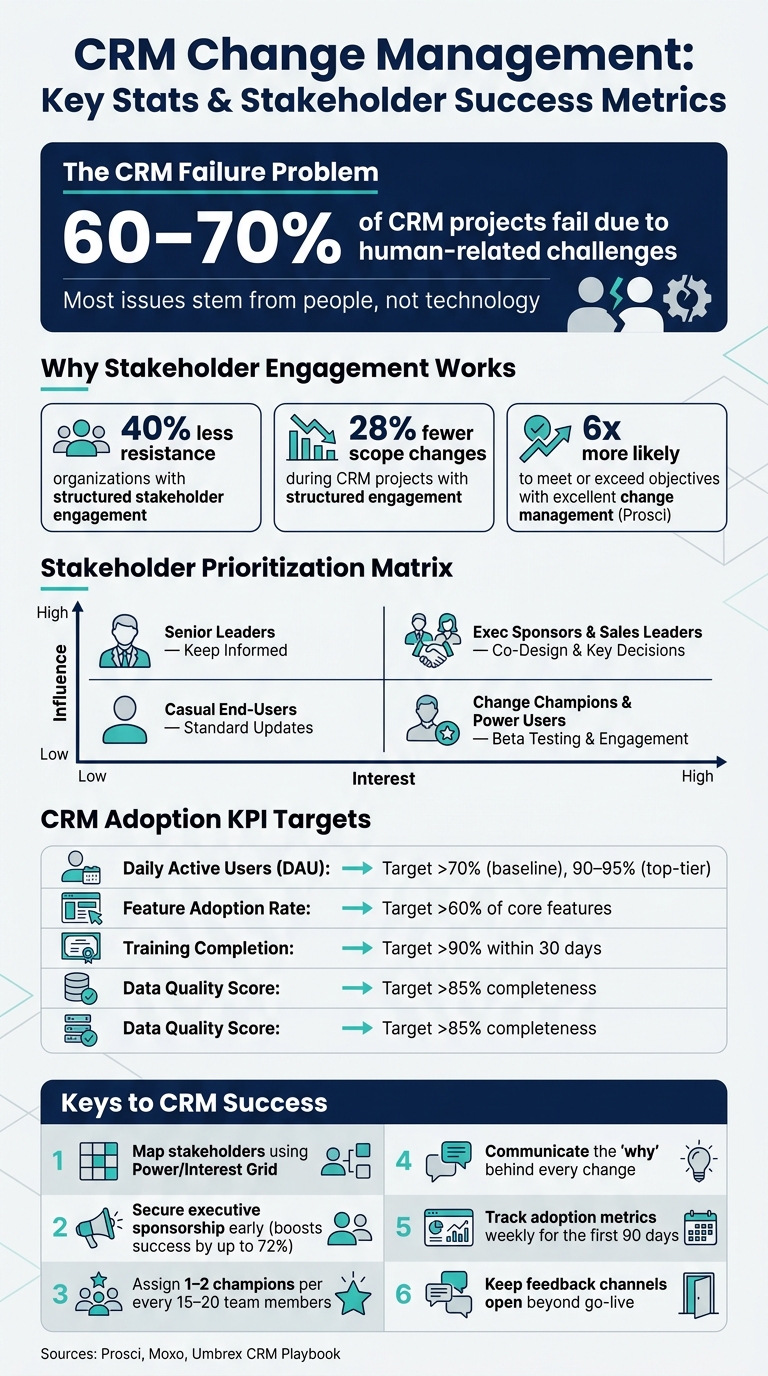
CRM Change Management: Key Stats & Stakeholder Success Metrics
Identifying and Prioritizing Stakeholders in CRM Projects
Identifying Key Stakeholder Groups
CRM projects touch nearly every part of a business, so identifying who’s involved – and what their roles are – should happen as early as possible. Stakeholders generally fall into two main categories: internal and external.
Internally, key groups include executive sponsors, department heads (like Sales, Marketing, and Customer Support), IT and data governance teams, end-users, and change champions. Change champions are especially important – they act as trusted intermediaries between leadership and daily operations. Other support departments like HR, Finance, and Legal also play vital roles, addressing issues such as cultural alignment, ROI tracking, and compliance with privacy laws like GDPR and CCPA [2].
| Department | Role in CRM Change |
|---|---|
| Sales & Business Dev | End-users focused on lead and pipeline management |
| Marketing | Manages campaign attribution and lead scoring |
| Customer Support | Handles case management and customer history |
| IT & Data Governance | Oversees technical architecture, security, and data integrity |
| Finance | Tracks ROI and supports sales forecasting |
| Legal & Compliance | Ensures data privacy and contract compliance |
Externally, customers and partners may also be impacted, especially if the CRM changes affect communication, response times, or service delivery. Once you’ve identified these groups, the next step is to assess their level of involvement.
Using Stakeholder Analysis Tools
After identifying stakeholders, it’s important to understand their engagement levels. Two tools can help with this process.
The Power-Interest Grid is a straightforward 2×2 matrix that categorizes stakeholders based on their authority and the degree to which the CRM change affects them. This helps determine who needs frequent updates versus occasional check-ins [8]. Another tool, the Stakeholder Engagement Assessment Matrix (SEAM), compares each stakeholder’s current engagement level with the desired level, ranging from Unaware to Leading [9]. These tools together highlight where engagement gaps exist.
"The power-interest grid is an input to process design. It tells you who your stakeholders are and how engaged they are. It does not tell you what they must do, when, or what fails when they do not act." – Moxo [8]
An often-overlooked but critical step is action mapping – breaking down what each stakeholder needs to do and when, especially during team handoffs. For example, when Sales passes a lead to Customer Support, these transitions can be weak points in CRM workflows [8]. Once you’ve completed the analysis, it’s time to focus on prioritization.
How to Prioritize Stakeholders for Engagement
Using the insights from your analysis, stakeholders can be prioritized based on their influence and interest [10].
Here’s a practical way to approach this:
- High Influence + High Interest: These stakeholders, like executive sponsors or sales leaders, should be deeply involved in co-design sessions and major decisions.
- High Influence + Low Interest: Senior leaders outside the core project team fall here. Keep them informed with regular updates on business outcomes.
- Low Influence + High Interest: Change champions and power users fit this category. Keep them engaged and involve them in beta testing.
- Low Influence + Low Interest: These are casual end-users. Provide them with standard updates and monitor their feedback.
Don’t forget informal influencers – employees who may not have official titles but whose opinions carry weight among their peers. These individuals are often long-time employees or respected technical experts. Engaging them early can help ease resistance to change. Research shows that organizations with structured stakeholder engagement experience 40% less resistance and 28% fewer scope changes during CRM projects [10].
sbb-itb-f02ae4e
Building a Stakeholder Engagement Plan
Setting Engagement Goals and Metrics
Once you’ve mapped out your stakeholders, the next step is to define success using clear and measurable KPIs. Establish these baseline metrics before launch to track progress effectively. Key metrics could include Daily Active Users (DAU), feature adoption rates, training completion percentages, and data quality scores. These benchmarks provide a solid foundation for evaluating success.
| Adoption Metric | Target Goal | How to Measure |
|---|---|---|
| Daily Active Users (DAU) | >70% of licensed users | System usage analytics |
| Feature Adoption Rate | >60% of core features | Feature-specific tracking |
| Training Completion | >90% within 30 days | Learning Management System (LMS) |
| Data Quality Score | >85% completeness | Regular data audits |
Monitor these metrics weekly during the first 90 days after launch. Early successes can help build momentum and reinforce the value of the project [3].
"Projects with excellent change management are 6x more likely to meet or exceed objectives than those with poor change management." – Prosci [3]
With these metrics in place, you can fine-tune your communication and engagement strategies to address the unique needs of different stakeholders.
Tailoring Communication Strategies
Effective communication starts with understanding what matters most to each stakeholder group. For instance, sales teams may prioritize reducing data entry, while CFOs might focus on forecast accuracy. By aligning your messaging with their specific concerns, you can keep everyone engaged and aligned.
The 5W framework is a helpful tool for structuring communication:
- Who needs the information?
- What do they need to know, tailored to their role?
- When should they receive it?
- Where will they access it?
- Why does it matter to them?
Addressing the "What’s In It For Me" (WIIFM) question ensures your messages resonate on a personal level [3].
Using a mix of communication channels can also enhance engagement. Town halls are great for presenting the overall vision, while departmental briefings allow managers to address team-specific concerns. For real-time updates, in-app alerts work well. Meanwhile, "white-glove" onboarding sessions for executives can showcase how the CRM provides the strategic data they need. Additionally, having executive sponsors actively use the system – such as by requesting reports – sends a clear message to the organization that CRM adoption is a priority.
"The ‘silent killer’ of CRM projects is hidden resistance. This occurs when staff nod along in meetings but continue using their old spreadsheets in private." – Warren Davies, Founder of BeyondCRM [5]
Using CRM Experts Online to Support Engagement
For additional support, consider leveraging expert resources. A strong engagement plan benefits from a reliable support infrastructure, and CRM Experts Online offers solutions that address both the technical and human aspects of CRM adoption.
Their Comprehensive Support plan ($4,500/month) includes unlimited live training, AI integration, and a dedicated team to guide you through the change management process. For smaller teams, the Managed Support plan ($1,300/month) provides CRM development, consulting, and shared project management to keep everything on track. Both options aim to minimize obstacles that can hinder CRM rollouts, such as training gaps or data quality issues.
AI integration can be especially impactful. Sales teams using AI-enabled CRMs are 1.3x more likely to exceed their targets [7]. The AI tools offered by CRM Experts Online simplify adoption by providing next-best-action recommendations directly in the platform. This makes the CRM feel like a helpful tool rather than an added chore, encouraging users to embrace it more readily.
Building Collaboration and Alignment Among Stakeholders
Setting Up Governance Structures
Rolling out a CRM system requires a clear framework for decision-making. Without it, even minor disagreements can spiral into delays, revisited decisions, and lost momentum.
A practical way to manage this is by implementing a three-layer governance structure that organizes decisions by their level of impact:
| Governance Layer | Primary Owners | Key Responsibilities |
|---|---|---|
| Executive Steering | CRO, CSO, COO, CIO, Finance | Approve funding, set priorities, resolve conflicts, and establish go-live thresholds |
| Design Authority | Product Owner, Process Owners, Architects | Define process standards, ensure data model consistency, and manage customizations |
| Delivery Leadership | Project Manager, Workstream Leads | Oversee weekly execution, mitigate risks, and prioritize tasks |
To maintain efficiency, keep the executive steering committee limited to senior decision-makers. Decisions presented to this group should come with a concise, one-page brief that outlines the options considered and the potential impact of inaction.
Another essential tool is a Decision Log – a living record of every key decision, including its rationale and follow-up actions. This log prevents teams from rehashing settled issues, saving time and keeping the project moving forward.
"A steering model is not a meeting calendar. It is a decision system. The purpose is to make the right decisions at the right level, fast enough to avoid thrash." – Umbrex CRM Playbook [11]
This structured approach ensures that decision-making supports the alignment of varied departmental objectives.
Aligning Stakeholder Goals
Different departments often have distinct definitions of CRM success. For instance, Sales might prioritize pipeline visibility, Marketing may focus on cleaner lead data, and Service could value comprehensive customer histories. Aligning these goals early is essential.
The best way to do this is by mapping each department’s goals to measurable CRM outcomes. For example, instead of a vague goal like "improve sales efficiency", set a specific target such as reducing the average sales cycle from 45 to 30 days. Clear, measurable objectives help teams stay focused and hold leadership accountable for delivering results [7].
Assigning benefit owners is another critical step. Leaders from Sales, Marketing, and Service – not the IT team – should take responsibility for achieving the business outcomes tied to the CRM. When those who directly benefit from the system are also responsible for its success, the CRM becomes a core business initiative rather than just another IT project.
Finally, creating a shared language is key to avoiding friction. For example, disagreements over what qualifies as a "lead" or when a deal progresses to the next stage can slow progress. Documenting these definitions directly within the CRM ensures everyone is on the same page – no more relying on forgotten slide decks [11].
Once goals are aligned, teams can seamlessly collaborate using integrated tools, as discussed below.
Supporting Day-to-Day Collaboration
With strong governance and aligned goals in place, fostering daily collaboration is the next step in driving CRM adoption. Role-based dashboards make this easier by allowing each team to focus on their priorities: Sales can monitor their pipeline, Marketing can track campaign performance, and Service can manage open cases – all within the same platform [6].
When managers use CRM data for reviews and forecasts, it reinforces the system as the single source of truth [12]. On the flip side, if executives continue relying on spreadsheets, frontline staff are likely to follow suit, undermining the CRM’s role.
Integrating the CRM with tools teams already use – like Slack or Microsoft Teams – can also reduce friction. Features like real-time notifications and in-app approvals minimize context switching and speed up responses. Additionally, providing a structured feedback channel where users can report issues and see them addressed through regular updates helps build trust and ensures long-term collaboration.
Stakeholder Engagement 101: How to Do Stakeholder Engagement Management
Keeping Stakeholders Engaged After Implementation
Once a CRM system is up and running, the work isn’t over. Keeping stakeholders engaged after implementation is essential for ensuring long-term success. Building on earlier collaboration, it’s critical to maintain this momentum through consistent monitoring and ongoing support.
Tracking Engagement and CRM Adoption
The go-live date is just the start of the journey. Without a structured plan to monitor how the system is being used, adoption issues can snowball before anyone notices.
Tracking key adoption metrics regularly is the best way to stay ahead of potential problems. Daily Active Usage (DAU) is one of the clearest indicators of success. Aim for 70% or higher DAU as a baseline for ROI, with 90–95% considered top-tier performance [6]. Another important metric is data completeness – this measures how many records have all required fields filled in. For critical fields, this number should stay at 85% or more [6]. When data quality drops, users lose trust in the system, which often leads to a vicious cycle where the CRM gets abandoned.
To keep these metrics on track, establish a governance routine. This could include weekly pipeline reviews, bi-weekly data audits, and quarterly roadmap updates. If adoption metrics fall below target for two weeks in a row, escalate the issue to executive leadership rather than waiting for the next scheduled review [13].
| KPI Category | What to Measure | Target |
|---|---|---|
| Daily Active Usage | % of users logging activity daily | 70% baseline; 90%+ goal |
| Data Completeness | % of records with required fields filled | 85–95%+ |
| Pipeline Hygiene | % of deals without updates in 14+ days | Under 10% |
| User Adoption Rate | % of users actively using the system | 80%+ within 90 days of go-live |
While these metrics guide immediate actions, the real key to sustained adoption lies in ongoing training and support.
Providing Ongoing Training and Support
A single training session at launch simply isn’t enough. Over time, skills fade, new features are introduced, and team members change. To keep everyone up to speed, adopt a multi-phase training approach.
Start with role-specific workshops during weeks 2–8 after launch. Follow up with monthly sessions to introduce new features and quarterly business reviews that tie CRM usage to broader strategic goals [6]. For Agile teams, consider just-in-time training – this method delivers short, targeted sessions for each new feature as it’s released, preventing users from feeling overwhelmed [5].
"CRM adoption works best when leadership treats it as a continuous program, not a project with a go-live date." – Tamer, Singleclic [14]
Beyond formal training, having a strong support system makes a huge difference. This includes maintaining a help desk, creating a searchable knowledge base with short video tutorials, and empowering Change Champions – experienced users who can guide their colleagues [1][6]. Regular "Office Hours" sessions also allow users to ask specific questions and get real-time help with their workflows [6][2]. For advanced technical guidance, services like CRM Experts Online can provide additional support as your system evolves.
Reviewing Stakeholder Needs Over Time
Business needs change, and a CRM setup that worked perfectly at launch might feel outdated a year or two later. Regularly reviewing stakeholder needs ensures the system stays aligned with current priorities.
Schedule periodic reviews – monthly for quick feedback, quarterly for roadmap adjustments, and annually for a full strategy audit. These reviews should focus on a simple but critical question: Is the CRM still solving the right problems for each team? Use pulse surveys, focus groups, and suggestion forms to gather input and identify potential issues before they grow [1].
However, collecting feedback is only half the battle. Acting on it is what keeps stakeholders engaged. When users see their suggestions lead to real changes, they’re more likely to stay invested. Sharing success stories and quick wins through team meetings or newsletters also reinforces the value of the system and keeps morale high [4][1].
The next section will summarize these insights and outline actionable steps for effective CRM change management.
Conclusion and Key Takeaways
The heart of successful CRM change management lies with people, not just the technology driving it [5]. This is underscored by some eye-opening numbers: 60–70% of major change initiatives fail due to human-related challenges [4]. However, organizations that implement structured change management processes are 6x more likely to achieve or surpass their project goals [3]. In short, CRM success hinges on engaging stakeholders effectively, rather than focusing solely on the tools.
Several interconnected strategies help ensure CRM success. Begin by creating a detailed stakeholder map using the Power/Interest grid. Secure visible and active executive sponsorship early on – this alone can boost the chances of project success by up to 72% [3]. Identify 1–2 champions for every 15–20 team members to act as advocates for the initiative. Clearly communicate the purpose behind every change, design training that aligns with specific roles and workflows, and keep feedback channels open well beyond the go-live phase. Finally, track adoption metrics weekly during the first 90 days, and address any declines in engagement promptly.
FAQs
Who should own CRM adoption – IT or business leaders?
CRM adoption needs to be driven by the business side, not treated as just another IT task. While IT teams manage the technical setup, it’s up to business leaders to ensure the system aligns with the company’s goals and day-to-day operations.
To make this happen, a cross-functional steering committee is essential. This group should include executive sponsors, department heads, and project managers. Their job? To set clear objectives, guide the adoption process, and ensure everything stays on track. For added support, CRM Experts Online provides customized AI-powered CRM solutions designed to meet these needs.
How do I find and activate informal influencers for CRM change?
To find informal influencers, start with a stakeholder analysis using a power/interest grid. This method helps identify well-regarded, enthusiastic users who can influence others. Once identified, bring them into a champion network where they can play a key role in driving success. Equip them with early updates, specialized training, and a feedback loop to keep them engaged and effective.
These influencers act as a bridge between executive strategies and frontline execution. They provide peer support, collect valuable feedback, and demonstrate the desired behaviors to others. For added support, tools like those from CRM Experts Online can help streamline operations and ensure smoother adoption.
What should I do if CRM usage drops after go-live?
A decline in CRM usage after launch often points to challenges with user adoption. To address this, start by examining adoption telemetry to locate the specific areas where usage is dropping. Look at key metrics like login frequency and record creation rates, comparing them to your initial targets.
Gather user feedback to uncover the root causes of the issue. Are there bugs causing frustration? Are there training gaps leaving users unsure of how to use the system? Or are there features missing that users expected? Once you’ve identified the problem, communicate clear timelines for fixing these issues.
Finally, prioritize ongoing, role-specific training to help users feel confident with the CRM. This ensures long-term adoption and tackles any friction points that might be slowing users down.
Related Blog Posts
- CRM Data Migration Guide: Best Practices and Tips
- 5 Steps for Cross-Functional CRM Onboarding
- Checklist for CRM Change Communication Success
- Leadership Roles in CRM Change Management

CRM & ERP Enterprise Technology Expert and Entrepreneurial Executive with 20+ years of leading CRM, ERP, Customer Experience, and Block-chain initiatives and projects across internal and customer facing technologies. Proven success in closing large deals in Pre Sales customer facing engagements and deploying enterprise wide CRM & Customer Experience solutions internationally and domestically.