
Best Practices Guide: Integrating CRM and Marketing to Automate Manufacturing Operations
Built on real-world integration insights from a U.S. manufacturing project
Recently, I was working with a U.S.-based manufacturer looking to streamline operations and marketing automation across their entire tech stack. They had multiple systems running side-by-side, and the problem was clear: too much duplication, too many silos, and not enough actionable data flowing between tools.
Their tech stack looked like this:
| System | What’s Integrated | Direction |
|---|---|---|
| Max ERP | Customers, quotes, inventory, pricing | ↔ CRM |
| Dynamics GP | Credit limits, account status | ← CRM |
| Zoho CRM / HubSpot CRM | Campaigns, quotes, engagement logs | → Max ERP |
| SPEAR Portal | Service and calibration logs | → CRM |
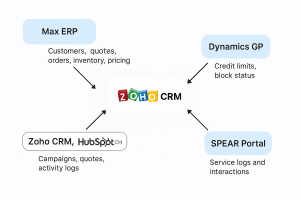
They came to us with a goal: consolidate and integrate all these tools into a centralized, Zoho CRM-powered automation ecosystem. Here’s what we built—and what you can learn from it.
✅ Why CRM-Marketing Integration Is a Must in Manufacturing
Drive Operational Efficiency
Syncing customer records, quote workflows, and service history across ERP and CRM platforms eliminates manual entry and costly mistakes.
Enable Proactive Marketing
By tapping into ERP data like serial numbers and service logs, you can anticipate customer needs instead of reacting to them.
Enhance Customer Experience
CRM automation helps you send the right message, to the right contact, at the right time—whether it’s a service reminder or a personalized quote.
???? Key Integration Practices That Work
1. Centralize Customer Data
Start by syncing your Max ERP records into Zoho CRM or HubSpot CRM. Use unique account identifiers to avoid duplication. Let CRM be your go-to system for updates, then push data downstream into Dynamics GP to handle credit limits and flags.
2. Import Serial & Service History
Bring in:
Serial_Number_History from ERP
SPEAR Portal for service and calibration logs
Field Service Tools like Zoho FSM or Salesforce Field Service
This connects real-world usage and lifecycle data to your CRM, powering campaigns that are actually relevant.
3. Quote-to-Order Automation
Let CRM handle quoting logic—by division, currency, and product line—and push approved quotes back to Max ERP or GP. Don’t forget to map your notes and serials to ERP format (e.g., *12345 format).
4. Smart Marketing Workflows
Segment by:
Serial number
Service history
Distributor vs. End-User accounts
Then automate campaigns like:
Warranty or calibration reminders
Upgrade notifications
Demo conversion nudges
Distributor-targeted promos
5. Demo Inventory Lifecycle
Track everything from request to return inside CRM. Use automation to sync quote-to-order transitions and manage inventory movement through ERP.
???? Integration Touchpoints Recap
Here’s the big picture of how systems talk to each other:
| System | What’s Integrated | Direction |
|---|---|---|
| Max ERP | Customers, quotes, inventory, pricing | ↔ CRM |
| Dynamics GP | Credit limits, account status | ← CRM |
| Zoho CRM, HubSpot CRM | Campaigns, quotes, activity logs | → Max ERP |
| SPEAR Portal | Service and calibration logs | → CRM |
???? Smarter Marketing & Analytics
Pull ERP data (orders, service, invoices) into Zoho Analytics or Power BI
Auto-capture leads from Google Ads, LinkedIn, and Facebook Ads
Use Salesforce Einstein or other AI tools to recommend next-best products or services
???? Customize CRM to Fit Your Workflow
Add modules for quote versioning, product configurator options, and rep-specific fields
Let reps build complex quotes in CRM that sync rules from ERP (so your ops team doesn’t need to double-check everything)
???? Special Considerations for Manufacturing
Distributors
Even when the PO comes from a distributor, make sure you’re capturing end-user info in CRM. This allows you to run service campaigns and upsell directly.
Services
Enable quoting for services like installation, calibration, and on-site repair—each with their own part numbers—then push them into ERP for fulfillment.
Shipping & Tax
Multi-location quoting? No problem. Pull tax and freight estimates from ERP or Avalara into CRM quoting logic.
???? Governance & Data Integrity
Validate serial number formats and discount rules
Track all quote approvals and configurator changes
Maintain version control to ensure compliance and historical auditability
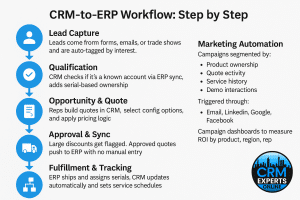
???? CRM-to-ERP Workflow: Step by Step
Lead Capture
Leads come from forms, emails, or trade shows and are auto-tagged by interest.Qualification
CRM checks if it’s a known account via ERP sync, adds serial-based ownership.Opportunity & Quote
Reps build quotes in CRM, select config options, and apply pricing logic.Approval & Sync
Large discounts get flagged. Approved quotes push to ERP with no manual entry.Fulfillment & Tracking
ERP ships and assigns serials. CRM updates automatically and sets service schedules.Demo Inventory Flow
Demo requests are tracked in a CRM pipeline. If customer converts, it becomes a sales order.Marketing Automation
Campaigns segmented by:Product ownership
Quote activity
Service history
Demo interactions
Triggered through:
Email, LinkedIn, Google, Facebook
Campaign dashboards to measure ROI by product, region, rep
???? Glossary & System Backlinks
Zoho CRM – Unified CRM platform for automation, quoting, and sales enablement
HubSpot CRM – Inbound-focused CRM for marketing and engagement tracking
Max ERP – Manufacturing ERP covering MRP, quoting, and inventory
Dynamics GP – Financial and operational ERP
SPEAR Portal – Service and calibration tracking platform
Zoho FSM – Field service and work order management
Salesforce Field Service – Service dispatch and technician tools
Zoho Analytics – Business dashboards and custom reports
Power BI – Data visualization platform
Avalara – Automated tax calculation and filing
Salesforce Einstein – Predictive AI for sales and marketing
Google Ads, LinkedIn Ads, Facebook Ads – Paid lead generation tools integrated with CRM
???? Final Word
If you’re in manufacturing and juggling disconnected systems, you’re leaving efficiency and revenue on the table. Integrated CRM-Marketing-ERP systems don’t just streamline operations—they enable smart, automated growth.
The key is using CRM as your central command center.
Looking to connect your systems the right way?
???? Schedule a discovery session with CRM Experts Online and let’s build a system that scales with you.

CRM and ERP Expert
Founder of CRM Experts Online.Com
Founder of CRMCoPilot.AI