
Predictive support uses AI to identify and resolve customer issues before they arise, shifting from reactive problem-solving to prevention. This approach improves customer satisfaction, reduces costs, and even creates new revenue opportunities. However, implementing predictive support comes with challenges like data quality issues, maintaining AI models, and ensuring team adoption.
Key Takeaways:
- How it works: Combines machine learning, natural language processing, and real-time CRM integration to detect and address problems early.
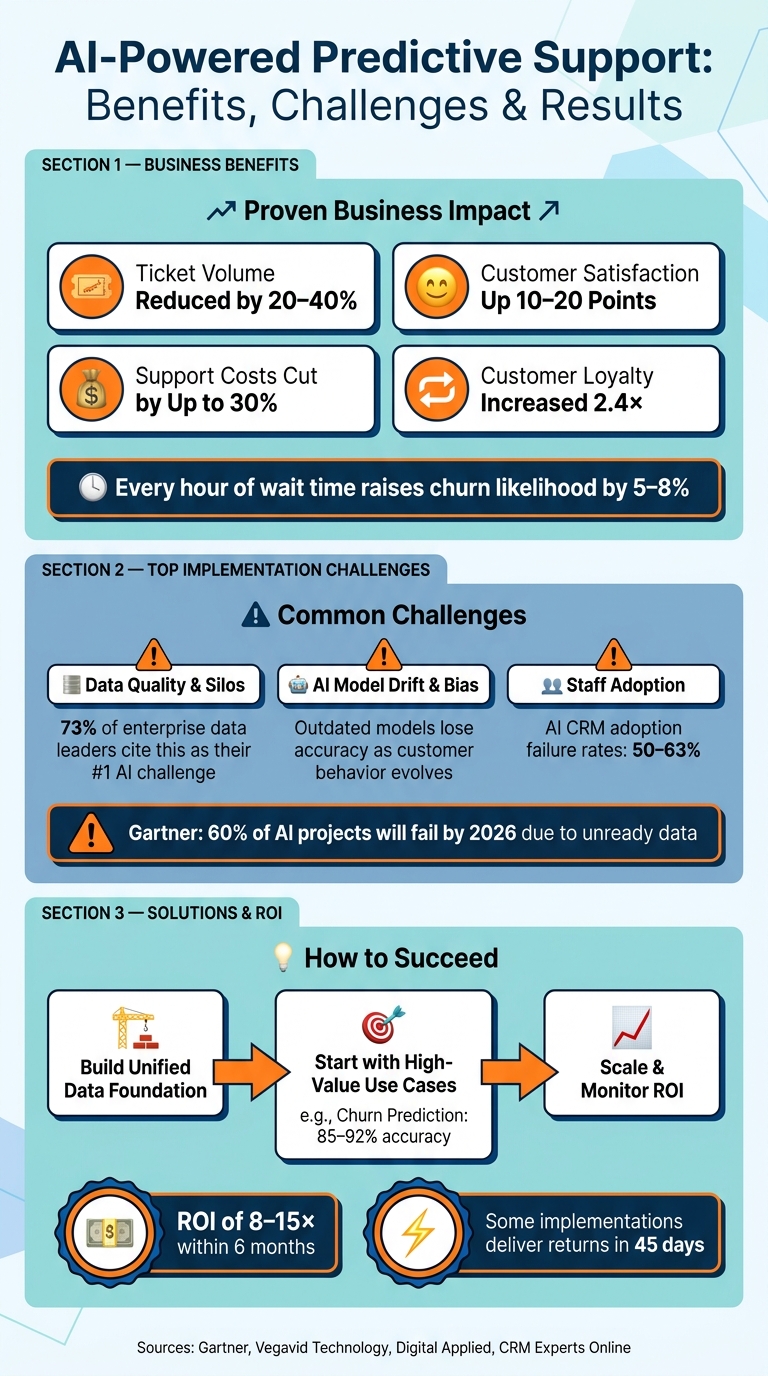
- Benefits: Reduces ticket volume by 20–40%, boosts customer satisfaction by 10–20%, and cuts support costs by up to 30%.
- Challenges: Poor data quality, outdated AI models, and employee resistance can hinder success.
- Solutions: Build unified data systems, start with high-impact use cases (e.g., churn prediction), and provide clear training to staff.
The goal is to integrate predictive tools into workflows effectively, ensuring long-term success and measurable results.
AI-Powered Predictive Support: Key Benefits, Challenges & ROI Stats
AWS re:Invent 2025-The AI revolution in customer support: Building predictive service systems-SPS315
sbb-itb-f02ae4e
Business Benefits of AI-Powered Predictive Support
When service teams shift their focus from reacting to problems to preventing them, the results are clear: better customer experiences, lower costs, and even increased revenue.
Better Customer Satisfaction
Did you know that the main reason customers leave isn’t a bad product? It’s the frustration they feel during the support process. Every hour a customer waits for a solution raises their likelihood of leaving by 5–8% [2]. Predictive support changes the game by identifying potential issues before customers even notice them. By catching these early signals and initiating proactive outreach, companies can resolve problems faster, boosting customer satisfaction by 5–10 points [2].
"Predictive AI does not replace service teams; it improves how they prioritize, allocate effort, and protect customer relationships." – Yash Singh, Chief Marketing Officer, Vegavid Technology [1]
Natural Language Processing (NLP) tools take this further. They can detect frustration in a customer’s tone during interactions, giving supervisors a chance to step in and resolve issues before they escalate into formal complaints.
Cost Savings and Resource Efficiency
Beyond making customers happier, predictive support can save businesses a lot of money. Each support ticket costs between $3 and $7 [2], so reducing the number of incoming tickets by up to 30% in just six months [7] adds up fast. By resolving straightforward issues automatically, AI allows agents to focus on complex cases. This shift also enables teams to plan resources more effectively, moving from a reactive to a proactive approach [1].
New Revenue Opportunities
Predictive support isn’t just about cutting costs or improving service – it can actually drive revenue. By analyzing customer behavior, predictive tools help transform support departments into revenue-generating teams. For example, these tools can identify customers nearing their plan limits and suggest tailored upsell opportunities. They can also detect the 70% of customers who silently stop engaging [7], allowing teams to intervene and resolve issues proactively. When companies address problems before they escalate, customer loyalty can increase by 2.4× [8].
"The shift is simple: from handling tickets to driving retention, expansion, and efficiency." – Deepak Sethi, AI Solutions Architect [4]
Here’s a quick look at how predictive insights can lead to revenue growth:
| Revenue Opportunity | Predictive Signal | Proactive Intervention |
|---|---|---|
| Upsell | Usage exceeding current plan limits | Personalized offer with relevant feature highlights |
| Retention | Declining usage or billing friction | Targeted outreach with solutions or roadmap clarity |
| LTV Growth | High engagement with advanced documentation | Early access to new features or premium support tier |
| Recovery | Failed payment or abandoned checkout | Real-time guidance or workaround assistance |
Common Challenges in Implementing Predictive Support
While predictive support offers clear advantages, putting it into practice comes with its own set of obstacles. Businesses commonly encounter three major challenges: poor data quality, maintaining AI models, and getting employees on board.
Data Integration and Quality Problems
The effectiveness of predictive AI depends entirely on the quality of the data it processes. Unfortunately, many businesses store customer data in fragmented systems – sales data in one CRM, marketing metrics in another platform, and support logs in yet another tool. These disconnected systems prevent the AI from gaining a complete view of the customer journey. Even when data is accessible, inconsistencies – like mismatched definitions, formats, or incomplete records – further complicate matters.
73% of enterprise data leaders cite data quality and completeness as their top AI challenge [9]. Gartner also estimates that by 2026, 60% of AI projects will fail because the data isn’t ready for AI applications [11].
"AI isn’t a magic wand; it’s a magnifying glass. It will expose whatever is in your data. If your data is wrong, AI will simply quickly reveal inaccuracies." – Dorian Sabitov, Salesforce Consultant [10]
These data issues don’t just affect the AI’s ability to make accurate predictions – they also make it harder to keep AI models up to date, as explained below.
AI Model Accuracy and Upkeep
Even a well-functioning AI model can quickly lose its edge. Customer preferences evolve, and products change, requiring constant retraining of the AI. One major risk is algorithmic bias. For example, if the training data only includes interactions with high-value customers, the AI may overlook warning signs from smaller or mid-market accounts until it’s too late [5]. Similarly, outdated contact information can lead to inappropriate outreach, damaging trust with potential clients [12].
When predictions seem unreliable, users often stop relying on them. This creates a situation known as the "Ownership Trap", where a flagged issue – like a high-risk customer – gets ignored because no one knows whether sales or support should take action [5].
These reliability concerns and unclear responsibilities can discourage employees from fully embracing predictive tools, which brings us to the next challenge.
Staff Adoption and Change Management
No matter how advanced the technology, a predictive system won’t succeed if employees don’t trust it. AI CRM adoption failure rates range between 50% and 63% [14], and the problem usually lies in how the system is introduced, not the technology itself.
Frontline employees often view AI tools with skepticism. Some fear the system is tracking their performance rather than helping them improve. Others dismiss AI-generated recommendations because they don’t understand why the system flagged a particular customer as high-risk. Without proper training that explains the "why" behind the AI’s decisions – not just the "how" of using the tool – employees are more likely to rely on their own judgment or manual processes instead [13].
"People adopt tools faster when they feel the system is helping them do better work, not replacing their judgment." – Nathan Rowan, Marketing Expert, Business-Software.com [13]
Overcoming these challenges is critical for unlocking the full potential of predictive support to improve customer satisfaction and streamline operations.
How to Address Implementation Challenges
Tackling issues like data silos, model drift, and low staff adoption requires a clear, step-by-step strategy. Each challenge has a practical solution, and addressing them in the right sequence can make the difference between a stalled project and one that produces measurable results.
Build a Unified Data Foundation
AI models can’t deliver accurate predictions without clean, consistent data that’s accessible from a single source. Often, customer data is scattered across departments, making it impossible to rely solely on pulling information directly from a CRM. The solution? Create a downstream analytical layer that transforms CRM data into stable, AI-ready metrics, such as lifecycle events and engagement patterns. Unlike transaction-focused systems, this layer is designed specifically for analysis. It’s also critical to preserve historical snapshots, as many CRM systems overwrite older records, which can disrupt model consistency [9].
"AI does not begin with models. It begins with data that was never designed for intelligence, made ready through intention." – Sathish Kumar Velayudam, Author, Dataversity [9]
Start with an AI Readiness Audit to identify gaps in your data infrastructure. For instance, CRM Experts Online provides a Starter audit priced at $3,600 (delivered in 4–6 weeks), which includes a readiness scorecard for select departments. Their Premium audit, at $7,500 (delivered in 6–8 weeks), offers a full organizational analysis and a 12–18 month roadmap with ROI projections [15].
Once your data foundation is in place, you can shift focus to deploying specific use cases that deliver immediate value.
Start with High-Value Use Cases
Instead of attempting a large-scale rollout, begin with a targeted, high-impact use case to build momentum. Churn prediction for high-value accounts is a great starting point. By feeding behavioral signals – like a 40% drop in login frequency or a spike in support tickets – into a model, you can achieve churn prediction accuracy between 85–92%. Implementing automated retention workflows can reduce churn by 15–25% [16].
But predictions alone aren’t enough; they need to be actionable. For example, when writing a churn score to your CRM, include the key contributing factors, such as "40% drop in logins over 30 days", so your support team knows what to address. A simple risk-tier framework with predefined playbooks for each risk category ensures your team can respond quickly and effectively [16].
"A mediocre model that triggers timely interventions outperforms a brilliant model that sits in a data warehouse unconnected to customer-facing workflows." – Digital Applied [16]
This focused approach builds confidence and lays the groundwork for broader AI adoption.
Work with CRM Experts Online
Expert support can significantly accelerate the integration of AI into your existing CRM workflows. CRM Experts Online specializes in embedding AI-powered predictive tools into CRMs, offering assistance from initial setup to ongoing model maintenance. Their Comprehensive and Managed Support plans cater to different business needs [3][17].
Staff adoption often improves when employees receive live training that not only demonstrates how to use the system but also explains why the AI flagged certain issues. This approach helps employees trust and engage with the new tools [3].
"You’re not just adopting AI; you’re gaining an entire ecosystem of tools and expertise to drive long-term success." – CRM Experts Online [3]
The Role of AI-Powered CRM Platforms
AI-powered CRM platforms are at the heart of predictive support, acting as the engine that connects sales, marketing, support, and service data. This integration ensures timely, automated responses that can transform customer interactions into seamless experiences.
"Your CRM shouldn’t just be a database – it should be an autonomous system that drives measurable outcomes." – CRM Experts Online
Key Features of AI-Integrated CRMs
AI-enhanced CRMs bring several practical tools to the table, making support operations more efficient and effective. Here are three standout features:
- Predictive case routing: This feature uses data like urgency, customer value, sentiment, and history to automatically assign cases to the most suitable agent or queue.
- Next-best-action recommendations: These suggestions guide agents on the best course of action, whether it’s escalating a case, sharing a relevant knowledge base article, scheduling a follow-up, or issuing an update. These recommendations are powered by detailed historical and behavioral insights.
- Automated notifications: Alerts are sent to customers or agents to address potential issues before they escalate. For example, a customer at risk of leaving might be flagged, or a service delay could prompt a warning.
By combining these features with unified customer profiles, workflow automation, and analytics dashboards, teams can achieve better visibility and maintain consistency across operations.
How CRM Experts Online Helps Businesses
For businesses to fully leverage AI-driven CRM capabilities, a tailored solution is key. CRM Experts Online specializes in creating custom CRM systems that align with specific workflows. Their services include CRM development, implementation, consulting, AI integration, plugins, hosting, and ongoing support. They work with platforms like Salesforce, HubSpot, Zoho, and NetSuite.
They offer three support plans:
- Comprehensive Support: $4,500/month, covering full-scale CRM development and unlimited live training for 12 months.
- Managed Support: $1,300/month, featuring a shared project manager over 6 months.
- Self-Guided Plan: $250/month, ideal for businesses that want to maximize value by accruing hours.
Getting Long-Term ROI from AI-Powered CRMs
The key to maximizing ROI lies in treating your CRM as a dynamic system. AI models need regular updates, and workflows must evolve with changing customer behaviors.
Important metrics to monitor include first response time, resolution time, case deflection rate, first-contact resolution, customer satisfaction scores, and escalation rates. Additionally, businesses should track reductions in ticket volume and improvements in retention driven by proactive interventions.
According to CRM Experts Online, companies that undergo a comprehensive AI strategy audit often see ROI between 8–15x their investment within just six months. Some implementations even deliver returns in as little as 45 days [15]. For those on higher-tier plans, quarterly and annual system health checks help ensure the CRM stays optimized as the business grows.
Conclusion: Making the Most of Predictive Support
AI-powered predictive support transforms customer service by shifting from reactive problem-solving to proactive prevention. This approach can reduce ticket volume by 20–40% and improve customer satisfaction by 10–20% [18]. On top of that, prevention is far more cost-effective – up to 5–10 times cheaper than resolving issues after they occur [18].
That said, achieving these results isn’t without its hurdles. Challenges like ensuring high-quality data, maintaining AI models, and earning staff trust require careful planning and effort. Building a solid foundation is critical for AI to deliver on its potential.
"The goal isn’t perfection out of the gate. It’s momentum." – Dale, Business and Marketing Blog [6]
The companies that benefit the most from predictive support see it as an ongoing journey rather than a one-off initiative. They begin with targeted use cases, develop reliable data pipelines, and gradually expand their efforts. Importantly, they understand that AI is most effective when it complements their team, not when it operates in isolation.
FAQs
What data is needed for predictive support to work effectively?
Predictive support thrives on well-organized, unified data pulled from a variety of sources. Here are the main types of information that fuel this process:
- Product usage data: Includes details like how often users log in, which features they use, and the amount of time spent in the app.
- Support history: Covers ticket categories, customer satisfaction (CSAT) scores, sentiment analysis, and instances of escalations.
- Operational metrics: Tracks factors such as system uptime, API error rates, and latency issues.
- Account information: Focuses on details like how long an account has been active, the subscription tier, and upcoming renewal dates.
- Knowledge base activity: Looks at search queries and patterns of article usage.
CRM Experts Online specializes in bringing all this data together through custom AI-powered CRM solutions, making it easier to implement predictive support effectively.
How can we keep predictive AI accurate as customers and products evolve?
To keep predictive AI accurate, think of it as a constantly evolving system that needs frequent attention. Schedule quarterly updates for algorithms to incorporate new data, adapt to seasonal trends, and fine-tune performance. Make sure your data pipelines – whether from CRM records, support logs, or product usage – are clean and well-integrated.
Combine quantitative models with qualitative inputs, such as insights from conversational AI, to get a clearer picture of shifts in customer behavior. Regularly compare predictions to actual outcomes, using those insights to retrain and refine your models for better accuracy.
How can we get agents to trust and use AI recommendations?
Gaining trust from agents starts with prioritizing transparency, maintaining human oversight, and ensuring AI adoption aligns with clear goals. Here are some practical ways to achieve this:
- Modeling behavior: Leaders can demonstrate how AI insights are meant to assist, not monitor, by actively using the tool themselves in a supportive way.
- Transparency: Always label AI-generated outputs clearly and give agents the ability to override AI recommendations when necessary.
- Feedback loops: Encourage agents to report errors and provide input, while showing them how their feedback leads to tangible improvements.
- Explainability: Offer straightforward explanations for AI suggestions so agents can understand the reasoning behind them, boosting their confidence in the system.
By focusing on these steps, organizations can create an environment where agents feel empowered and supported by AI rather than scrutinized.
Related Blog Posts
- AI in CRM: Demand Forecasting Basics
- How AI Predicts Customer Behavior Patterns
- Predictive Analytics in CRM: Opportunity Scoring
- How To Scale Predictive Analytics in CRM Systems

CRM & ERP Enterprise Technology Expert and Entrepreneurial Executive with 20+ years of leading CRM, ERP, Customer Experience, and Block-chain initiatives and projects across internal and customer facing technologies. Proven success in closing large deals in Pre Sales customer facing engagements and deploying enterprise wide CRM & Customer Experience solutions internationally and domestically.